Pokemon Gen I And Ii Link Cable Protocol
Table of Contents
- Motivation
- Introduction
- Physical Layer
- Pokemon Trading Protocol
- Generation I
- Generation II
- Time Capsule
Motivation
I grew up in the midst of the pokemon craze in the 90s, in my school the TV series became popular first, and soon after everyone was bringing in their gameboys to play the Pokemon games on breaks.
Eventually my parents got me a brand new Gameboy Color alongside a Pokemon Red cartridge, so my quest for catching ‘em all began!
The most frustrating thing about those games was trading, not only did i have to find someone playing Pokemon blue and willing to trade with me, but that person also had to own a Link Cable.
Not many children at my school owned a Link Cable so completing my Pokedex was really *HARD* (My original save file is still alive btw!).
What about Mew? Well, a couple of years later i got a Gameshark which i used to capture it.
The really interesting thing about all of this is that the Gameshark cartridge came with a Gameboy to PC(Parallel? port) cable which is the closest thing i had that resembles a Link Cable:
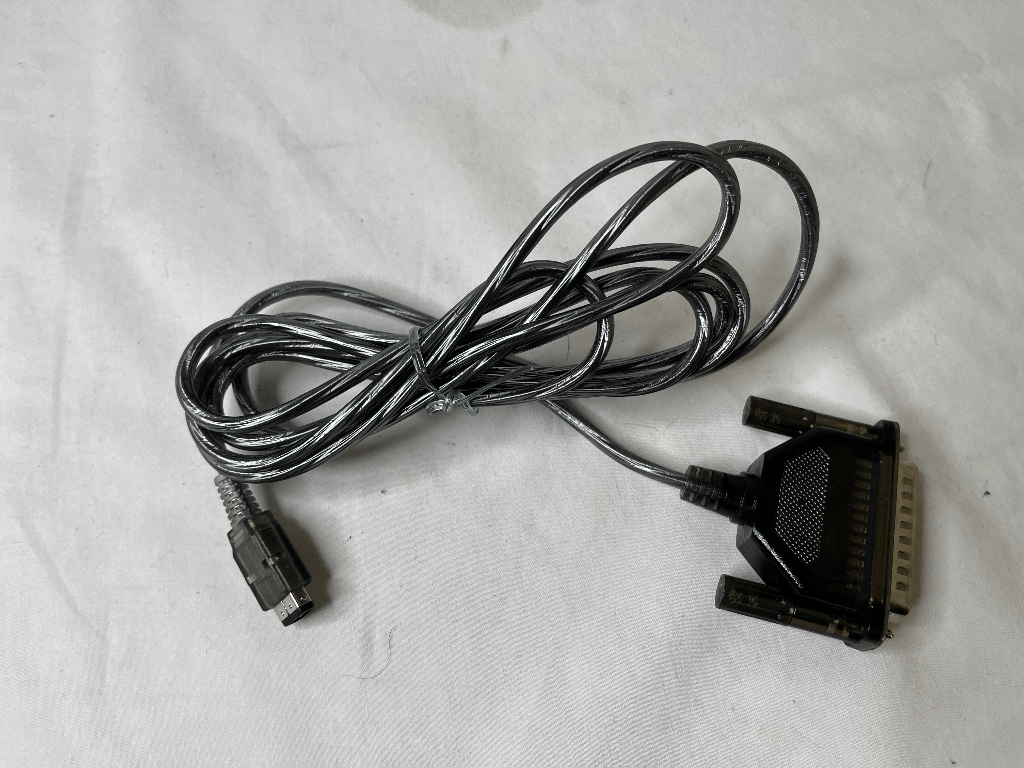
Gameboy to PC cable
That cable was used to upload/download cheats into the Gameshark, also to update its firmware. So of course i had to try it… Which ended up bricking my precious Gameshark. Now with a useless cartridge, the cable ended up collecting dust for decades.
About 5 years ago, while tinkering with a raspberry pi i suddenly remembered the cable. Would it be possible to trade Pokemon between a Gameboy and a PC?
I started searching for any existing information about this subject and it was mainly all bad news:
(Note: I was and still am a complete noob at this kind of stuff)
- Gameboy to PC:
- To this day i’m still not sure HOW this cable was originally used, is it serial? Is it parallel?
- If serial: It seems that PC serial ports communicate using the RS232 protocol which works with voltage levels way beyond of the 0v/+5v signals that the Gameboy can handle (I’ve seen the name MAX-232 thrown around a lot for adapting the signals) -> Overwhelmed.
- If parallel: Voltage levels match, so far so good… But my PC doesn’t have a parallel port anymore, even if i had one.. How would i control individual pins (either in Windows or Linux)? -> Overwhelmed.
- Gameboy to Raspberry Pi:
- Already knew how to read from / write to individual pins, great!
- GPIO pins work with 3.3V and are NOT 5V tolerant (DO NOT CONNECT RPI PINS TO A GAMEBOY DIRECTLY).
- Intro to logic level converters before even connecting a single cable -> Overwhelmed.
The only thing that kept me going was THIS BLOGPOST (Thank you Adan Scotney!) in which someone accomplished the exact same thing i was trying to do! However he used a.. “Stellaris Launchpad” which i had NO IDEA what it was (still don’t know).
So i knew it was possible, it wasn’t extremely difficult, and had all the information required to implement it on my own (or so i thought..). The only thing i didn’t have at the time was the hardware which i had no intention of buying and just kept the idea in the back of my mind while working on other projects..
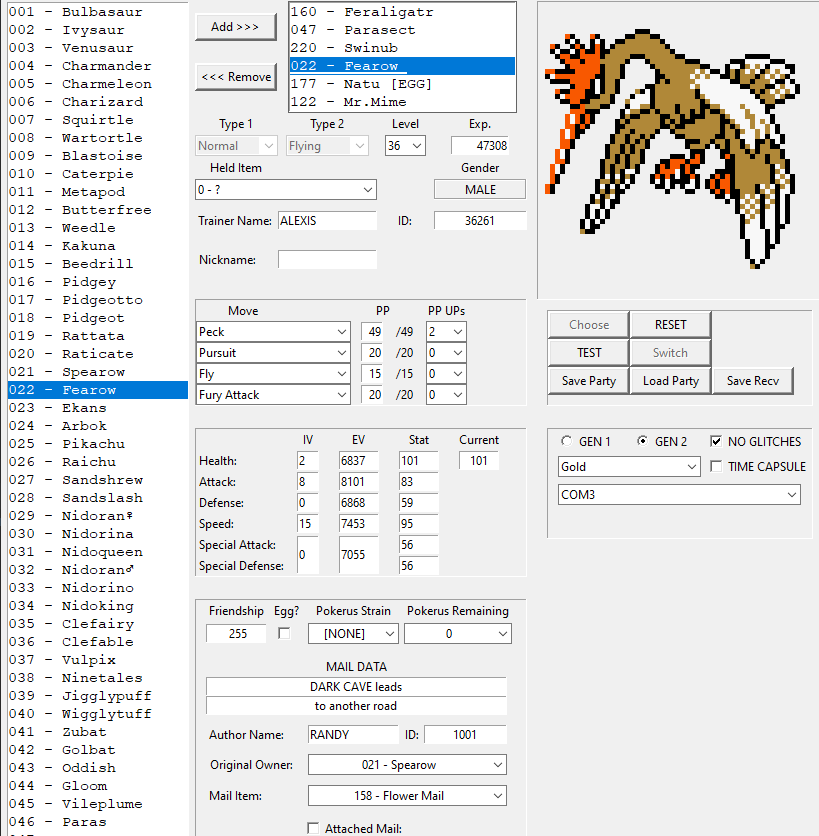
Fast forward to 2023: I found out that Arduino boards were REALLY cheap (compared to a RPI), and bought myself an Arduino Nano, a bunch of sensors, and started delving into the world of microcontrollers. Did some basic examples, then implemented communication protocols with different sensors until i felt confident for my next task: Trade pokemon between a PC and a Gameboy using the Arduino as an intermediary. [SPOILER: I DID IT!]
Introduction
The main goal of this post is to explain how trading works in pokemon red/blue/yellow and gold/silver/crystal in as much detail as possible, from the physical layer to the actual protocol implemented by those games.
I’ll also include the misconceptions and problems encountered along the way while implementing said protocol (many of the problems will look trivial to you!)
Physical Layer
Link Cable Pinout
The cable pins have already been described many times (1, 2, 3)
                                                              ___________
                                                             |  2  4  6  |
                                                              \_1__3__5_/
| # | Name | Description |
|---|---|---|
| 1 | VCC | +5V |
| 2 | SOUT | Serial Out |
| 3 | SIN | Serial In |
| 4 | Not Used | Not Used |
| 5 | SCK | Serial Clock |
| 6 | GND | Ground |
- Gameboys are able to provide 5V through this pin, some (unofficial?) accessories use it (E.G: night lights), it’s not used when connected to another Gameboy.
- Data is sent through this pin bit by bit. It is connected to SIN on the other side of the cable.
- Data is received through this pin bit by bit. It is connected to SOUT on the other side of the cable.
- Not used/Usage unknown/Haven’t found any additional reference to this pin.
- One Gameboy will generate a clock signal (see SPI section) in this pin to synchronize the transmission. Both Gameboys will read from and write into their corresponding pins only when the clock signal reaches specific states.
- Ground reference pin so both Gameboys share a common ground (EXTREMELY IMPORTANT *).
* My first mistake was ignoring the ground pin, i was just starting and tried to read what was being sent on each pin.. I remember reading the exact opposite of what was expected (E.G: Expected 101010 , got 010101 instead). I lost so much time trying to figure that out! The solution was connecting pin 6 to any of my arduino’s GND pins.
Signals
- Voltage levels on each pin should be either 0V (representing 0/LOW) or 5V (representing 1/HIGH).
- I haven’t tested this, but lower voltages may still work (e.g: 3V or 4V could also be considered as HIGH). Just make sure that whatever communicates with a Gameboy can tolerate 5V on its pins.
- I wouldn’t recommend using voltages higher than 5V as you could damage your Gameboy.
- Both SOUT and SIN normally stay at LOW (0V) when idle (it shouldn’t really matter)
- SCK stays HIGH when idle, a pullup resistor will ensure that 5V are read even when there’s nothing connected on the other end of the cable.
- Using a pulldown resistor on SCK should probably work, we’re only looking to read a consistent value from that pin when the other side isn’t transmitting anything (or isn’t even connected), otherwise the value will fluctuate randomly and we may confuse those fluctuations with an actual clock signal!
SPI
Concept
At this layer (physical) we’ll only be concerned with transmitting bits and bytes, their actual meaning will be dealt with in higher layers.
SPI (Serial Peripheral Interface) is a widely used communication protocol, it’s amazingly well documented (4, 5, 6, 7, 8) and is (in my opinion) quite easy to understand.
At its most basic level it has 2 lines used for sending and receiving data, one line for synchronization between the 2 peers, and one line for signaling the beginning/end of the transmission.
Why synchronization? Well, the peers need to know when to read from their input line and when to write into their output line, consider the following scenario:
Assuming LOW is 0 and HIGH is 1.. What binary number is being transmitted?

The safest bet would be 000101010:

But, there are other interpretations that are equally valid:

Also, where does the transmission actually start? (and end?):

I that even a single transmission?:

SPI solves this problem by introducing a shared clock which indicates when to read from and write to the data lines.
A clock is just a signal that switches between HIGH and LOW at regular intervals:
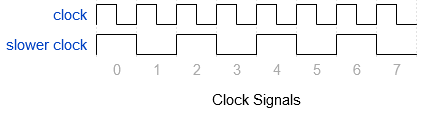
Where does the clock signal come from? One of the peers generates it while the other one just reads from that line!
- The peer that sends the signal is named MASTER (can be also named CONTROLLER or MAIN).
- The one that only reads from the clock line is called SLAVE (or PERIPHERAL, or even TARGET).
- Data lines are also named after those roles:
- The line where the master writes into and the slave reads from is called Master Out Slave In (MOSI).
- It can also be called Controller Out Peripheral In (COPI).
- Or Controller Out Target In (COTI).
- The line where the slave writes into and the master reads from is called Master In Slave Out (MISO).
- It can also be called Controller In Peripheral Out (CIPO).
- Or Controller In Target Out (CITO).
- The line where the master writes into and the slave reads from is called Master Out Slave In (MOSI).
- There is also a fourth signal which indicates when the transmission starts and ends:
- This line is controlled by the master as well.
- It’s called Slave Select (SS), Chip Select (CS), Chip Enable (CE).
- NOTE: SPI can support multiple slave nodes, and each one needs to have a separate SS line to the master (other lines are shared). They will only communicate when their SS line is active.
- Both Master and Slave send and receive data at the same time.
Here's an example of what SPI transmissions looks like (MOSI: 1011, MISO: 0110)
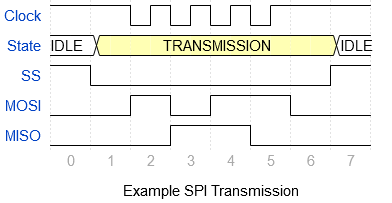
Note that in this example MOSI and MISO signals will only change when the clock signal is LOW.
- SPI operates in 4 different modes which are basically a set of rules that both master and slave have to agree upon beforehand.
- There are 2 parameters to consider:
- Does the clock stay idle at HIGH or at LOW? This is called Clock POLarity (CPOL).
- Is data read when the clock changes to LOW or to HIGH? and in that same line, is data written when the clock changes to LOW or to HIGH? This is called Clock Phase (CPHA).
- Read/write should be done on clock edges which is the moment when the clock changes values, a rising edge goes from LOW to HIGH and a falling edge goes from HIGH to LOW.
- It’s more important to write on time than to read on time, you can actually read your data whenever you want before the next clock edge.
Here is a table briefly describing the 4 SPI modes:
| SPI Mode | Clock Polarity when idle | When to read/write (edges) |
|---|---|---|
| 0 | LOW | R on RISING / W on FALLING |
| 1 | LOW | R on FALLING / W on RISING |
| 2 | HIGH | R on FALLING / W on RISING |
| 3 | HIGH | R on RISING / W on FALLING |
Most SPI implementations will only work with message lengths that are multiple of 8 bits (so the smallest unit that can be sent is 1 byte)
There is an additional thing to consider and that is the bit order of the data being read/written:
- If you wanted to send any number, for example 42 whose binary representation is 00101010 then you could write it from right to left or from left to right.
- Writing from left to right (0->0->1->0->1->0->1->0) means that we’re writing from its most significant bit onward (MSB).
- Writing from right to left (0->1->0->1->0->1->0->0) means that we’re writing from its less significant bit onward (LSB).
- Whatever order is chosen, both ends must respect it when writing and reading from the data lines.
- In our example if we read 42 in a different order (LSB instead of MSB or MSB instead of LSB) then we’ll end up with a flipped number: 01010100 (84 in decimal).
How Gameboys Implement SPI
Here i’ll describe some key aspects of the SPI implementation used by the Gameboys.
A detailed description about the implementation can be found HERE (Pandocs) and more importantly HERE (Gameboy Programming Manual Chapter 1 Section 2.4).
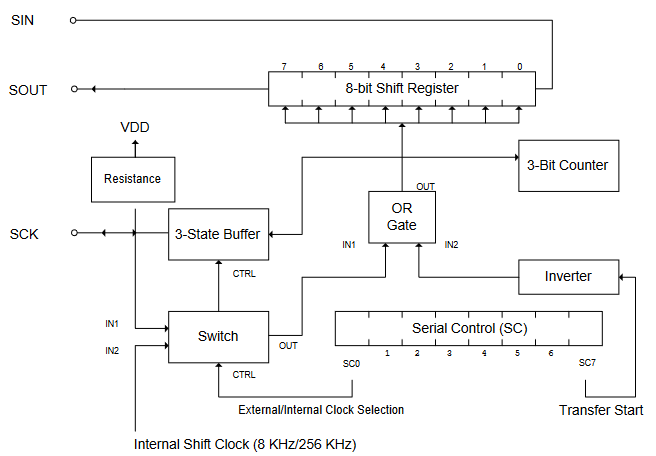
Serial communication block diagram (Gameboy Programming Manual)
- Gameboys use SPI mode 3 when communicating through the link cable, so the clock signal stays HIGH when idle, data is written on falling edges and is read on rising edges.
- Data is transferred byte by byte, that means that once 8 bits are transferred, an interrupt will trigger to signal the software that a byte has arrived/has been sent.
- Bytes are written/read from their Most Significant Bit (MSB) onwards, i.e. from left to right.
- THERE IS NO SS/CS LINE: The master will just generate a clock signal and the slave will read/write from/into data lines as soon as it detects the corresponding clock edges.
- This should be obvious but got me confused at first: The clock signal will only exist when data is being transferred, for some reason i thought that it was always active as long as the connection was established.
- The original Gameboy can only generate a 8192Hz clock (1 cycle/bit every 122μs or every 0.000122 seconds!).
- Gameboy Color can generate clocks at 4 different frequencies: 8192Hz, 16384Hz, 262144Hz, and 524288Hz.
-
Slave Gameboys have to adapt to any incoming clock signal, they support absurdly low speeds (even 1 cycle per month!) and up to 500KHz (original GB).
- Master/Slave Negotiation:
- Gameboys first poll the clock line, if they find a clock signal then they’ll act as a slave. If no signal is present then they’ll start sending their own clock signal (thus becoming master).
- This means that the first Gameboy that tries to initiate a connection will probably become master.
Things to keep in mind:
- Slave nodes cannot send anything on their own, they have to wait for the master’s clock signal first (which happens only when the master wants to transfer something themselves).
- Similarly slaves are unable to signal if they’re ready for the transfer or not, it will occur anyway and the master will read whatever is in its input signal.
- This is why master nodes need to be considerate and allow some time to pass between each transfer to make sure that the slave is ready for it!
- Transfers are simultaneous, but the slave may have to read something from its master before knowing what to send, so in many implementations slaves are 1 step behind their master:
-
(MASTER <-> SLAVE): (1) REQUEST1 <-> NOTHING (2) REQUEST2 <-> RESPONSE1 (3) REQUEST3 <-> RESPONSE2 etc.
-
Additional Restrictions in Pokemon Games
In the previous section i described the SPI capabilities of the Gameboy Hardware, HOW they’ll be used depends on the software (i.e. the games):
- Pokemon Games will use the lowest clock speed for transmissions (8192Hz). I’m assuming that this is to support trades between any hardware (original GB, GBP, and GBC).
- There seems to be a limit on how SLOW a clock can be, so slaves will timeout if no clock edge is detected after a certain amount of time.
- I’m not sure if slave pokemon games would support much higher clock speeds than the standard rate (haven’t tested it yet).
- It could be possible to change the clock rate at any time as long as it does not exceed the allowed limits.
Pokemon Trading Protocol
All the information provided in previous sections was tiresome to come by, as it’s scattered all over the internet. But the important thing is that it exists!
As mentioned before, i could only find one single resource that touches on this topic (Check it out!). It was crucial for my project and for my understanding of the protocol, however it came with several issues:
- The provided protocol description is.. vague to say the least (but a good place to start!)
- Both the protocol description and the provided PoC are incomplete (Barely enough to trade pokemon in the simplest scenarios).
- The code heavily relies on mirroring data to work (which may break some trades).
- It also expects the user to provide a valid buffer (which represents their pokemon data). The buffer itself has to follow certain rules not mentioned elsewhere!
- Some code may be missing (the demo video shows 2 pokemon being traded, but the code itself only reaches the trade screen).
- It only focuses on Gen I.
There are other resources available that implement the trading protocol but unfortunately it seems that all of them are heavily based on the one mentioned above (some even use the exact same code).
The actual trading algorithms implemented in the games are available HERE (Pokered: GEN I) and HERE (Pokegold: GEN II). Both projects were really helpful but the code is written in pure Gameboy assembly (similar to Z80) with little to no comments.
I’ll describe the trading protocol for generation I first, then include how generation II differs from it and what was added (both generations have a lot in common so it’s important to read both sections).
Generation I
Handshake
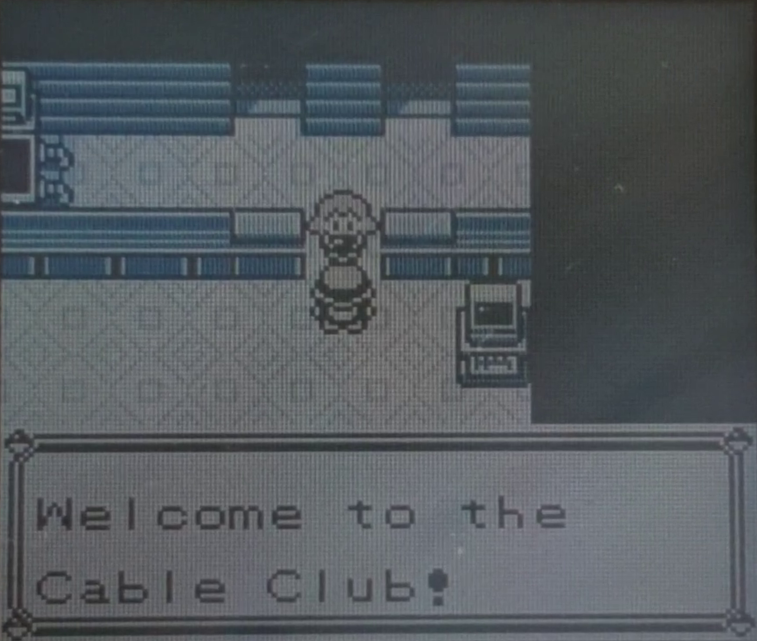
The first Gameboy to initiate the connection (by talking to the Cable Club NPC at the Pokemon Center) will probe the SCK line and won’t find any clock signal there, thus becoming master. It will repeatedly send 0x01 looking for a response on the other side, the slave gameboy must always reply with 0x02 (every time it receives 0x01).
Note that the slave gameboy won’t reply to the first 0x01 because it can only reply to what it has already been received, (the master->slave and slave->master transmission happens at the same time!) so the first message will always be replied with 0x00:
| #MSG | MASTER | SLAVE |
|---|---|---|
| 1 | 0x01 | 0x00 |
| 2 | 0x01 | REPLY for #1 HERE |
On my tests, the master kept trying to establish a connection approximately 89 times (i.e. sends 0x01 89 times with no response on the other side):
| #MSG | MASTER | SLAVE |
|---|---|---|
| 1 | 0x01 | 0x00 |
| 2 | 0x01 | 0x00 |
| 3 | 0x01 | 0x00 |
| 4 | 0x01 | 0x00 |
| 5 | 0x01 | 0x00 |
| …… | …….. | ……. |
| 89 | 0x01 | 0x00 |
| 90 | ABORT | ABORT |
Only one 0x02 response is needed for the master to accept the handshake, further responses are ignored, they can be of any value (i’d recommend to keep responding with 0x02):
Expected successful handshake:
| #MSG | MASTER | SLAVE |
|---|---|---|
| 1 | 0x01 | 0x00 |
| 2 | 0x01 | 0x02 (Responds to #1) |
| 3 | ACKNOWLEDGED! | 0x02 (Responds to #2) |
| 4 | …………….. | …………………. |
Abnormal successful handshake (still valid):
| #MSG | MASTER | SLAVE |
|---|---|---|
| 1 | 0x01 | 0x00 |
| 2 | 0x01 | 0x02 (Responds to #1) |
| 3 | ACKNOWLEDGED! | 0x99 (Responds to #2) |
| 4 | …………….. | …………………. |
Once a handshake is accepted by the master, it acknowledges it by sending 0x00 (a very bad choice for an acknowledge, it is the same as not sending anything!). The slave must also reply with 0x00, in my tests the acknowledge happens twice (both master and slave send 0x00 two times in a row)
A complete handshake looks like this:
| #MSG | MASTER | SLAVE |
|---|---|---|
| 1 | 0x01 | 0x00 |
| 2 | 0x01 | 0x02 |
| 3 | 0x00 | 0x02 |
| 4 | 0x00 | 0x00 |
| 5 | 0x00 | 0x00 |
After a handshake both players are asked to save the game.
Players Ready
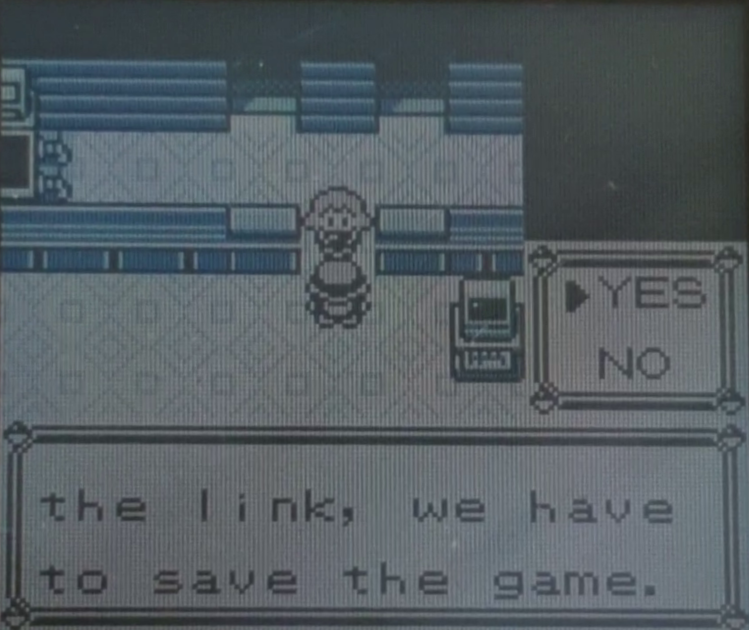
The master won’t send anything else until the player saves the game, similarly the slave will always reply with 0x00 until its player also saves their game.
Once the master saved its game it will repeatedly send 0x60 (to signal that it’s ready) until it receives 0x60 as well. It will abort and disconnect after several seconds of not receiving that same value! (it sends 0x00 before disconnecting)
Note: The games actually check that the highest nibble (4 bits) is 6, so any response between 0x60 and 0x6F is accepted. Gen II games use this feature to identify themselves when using the Time Capsule (only gen I <–> gen II trades are allowed, not gen II <–> gen II).
| #MSG | MASTER | SLAVE |
|---|---|---|
| X | 0x60 | 0x00 |
| X+1 | 0x60 | 0x00 |
| X+2 | 0x60 | 0x00 |
| X+3 | 0x60 | 0x00 |
| ……. | ……….. | ….. |
| X+7679 | 0x60 | 0x00 |
| X+7680 | ABORT(0x00) | 0x00 |
After saving its game the slave will also abort after some time without any messages coming from the master, but because it cannot send anything on its own it will just disconnect:
| #MSG | MASTER | SLAVE |
|---|---|---|
| X | FIRST 0x60 | ALREADY DISCONNECTED |
If both players are ready on that time window then the slave will be responding with 0x60 every time it receives that value. This can happen multiple times until the master acknowledges it (sending 0x00, the default acknowledge message). The slave will also reply the acknowledge message with its own acknowledge (also 0x00):
| #MSG | MASTER | SLAVE |
|---|---|---|
| X | 0x60 (FIRST) | 0x00 |
| X+1 | 0x60 | 0x60 (FIRST) |
| X+2 | 0x60 | 0x60 |
| X+3 | 0x60 | 0x60 |
| X+4 | 0x60 | 0x60 |
| X+5 | 0x60 | 0x60 |
| ….. | ………… | ……….. |
| X+13 | 0x60 (LAST) | 0x60 |
| X+14 | 0x00 (ACK) | 0x60 (LAST) |
| X+15 | 0x00 | 0x00 (ACK) |
| X+16 | 0x00 | 0x00 |
| X+17 | 0x00 | 0x00 |
| ….. | ………… | ……….. |
| X+24 | 0x00 | 0x00 |
| X+25 | MENU MSG | 0x00 |
Room Selection
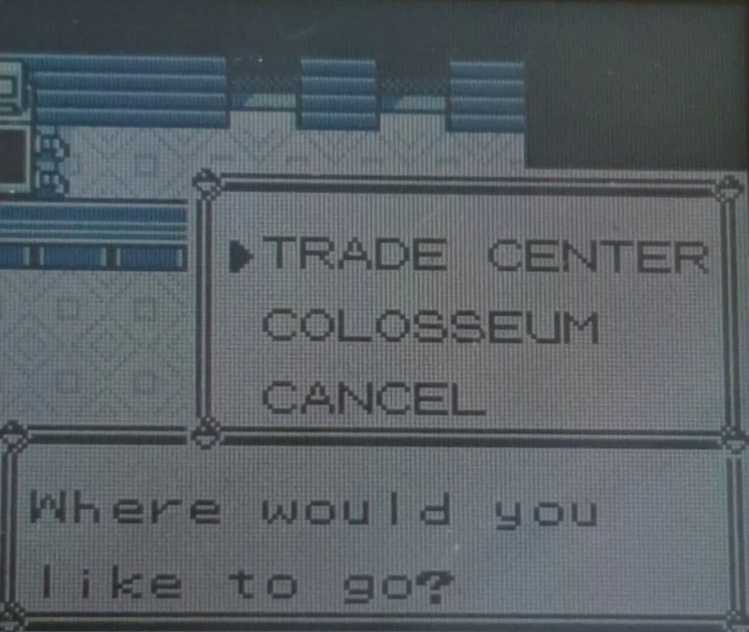
This is where players select what they want to do: Trade, Battle (Colosseum), or Cancel. They can also exit the menu (by pressing B) at any time.
Both gameboys will continuously send which menu is currently being selected, the messages are sent twice and then there’s one acknowledge before repeating the loop:
| #MSG | MASTER | SLAVE |
|---|---|---|
| X | MENU MSG #1 | 0x00 |
| X+1 | MENU MSG #2 | MENU MSG #1 |
| X+2 | 0x00 | MENU MSG #2 |
| X+3 | MENU MSG #1 | 0x00 |
| X+4 | MENU MSG #2 | MENU MSG #1 |
| X+5 | 0x00 | MENU MSG #2 |
| X+6 | MENU MSG #1 | 0x00 |
| X+7 | MENU MSG #2 | MENU MSG #1 |
| X+8 | 0x00 | MENU MSG #2 |
| INFINITY | ………… | ……….. |
Menu messages have the following format:
| HEX: | 0xD | 0xY | ||||||
| Binary: | 1 | 1 | 0 | 1 | y | y | y | y |
| Meaning: | PREFIX | B | A | #M | ||||
The highest 4 bits of menu messages are always 0xD.
The lowest 4 bits are the ones describing the action:
| Symbol | Description |
|---|---|
| B | 1 if Player pressed “B” |
| A | 1 if Player pressed “A” |
| #M | Menu item number (0, 1, or 2) |
- #M = 0: Trade, #M = 1: Colosseum, #M = 2: Cancel
- Colosseum takes priority over Cancel so #M = 3 (1 and 2 at the same time) is considered Colosseum (it shouldn’t be a valid message anyways!).
- If both A and B are 0 then #M indicates which item is currently being highlighted.
- If B is 1 then the player quit the selection menu while #M was being highlighted, it is considered as a cancel. Both gameboys disconnect.
- B takes priority over A, so if both A and B are 1 then it will also be treated as a cancel (This type of message shouldn’t exist under normal circumstances).
- If A is 1 then the player selected #M in the menu.
- If A is 1 and #M is 2 then the player chose “Cancel” both gameboys will abort and disconnect right now.
- The first player that selects (or cancels) something will pick that option for both of them!
- The selection will be made effective once the master ends an iteration (after sending an acknowledge(0x00)). The selection loop ends there and the master stops communicating (for now).
Here’s how it looks like when players select and choose the trade option in the menu (slave chose first!):
| #MSG | MASTER | SLAVE |
|---|---|---|
| X | 0xD0 | 0x00 |
| X+1 | 0xD0 | 0xD0 |
| X+2 | 0x00 | 0xD0 |
| X+3 | 0xD0 | 0x00 |
| X+4 | 0xD0 | 0xD4 |
| X+5 | 0x00 | 0xD4 |
| X+6 | DONE | DONE |
Players Ready for Trade
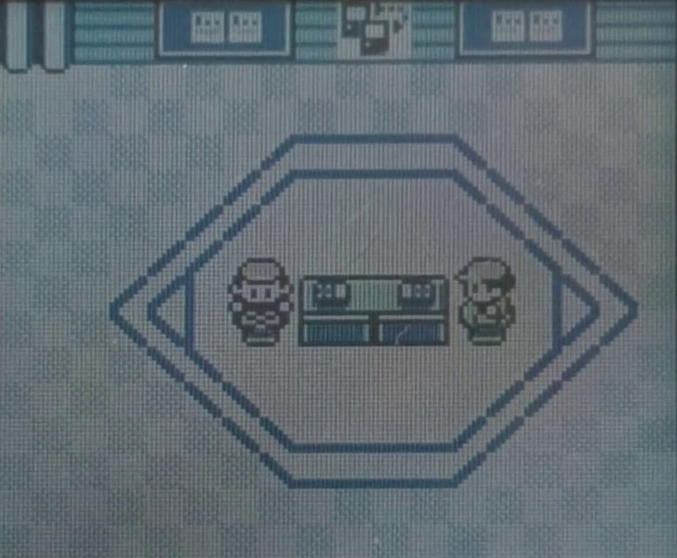
This step is very similar to Players Ready
Both players are now in the trade room! Here, they’re expected to press “A” facing the trading machine. Any other action (walking around) isn’t communicated to the other peer! The cable can even be unplugged and nothing will break.
When the master is ready (presses “A”), it will first send a single 0xFE which means that it doesn’t have any remaining data to send (i’m not sure WHY it would have something else to send at this point). Followed by an endless stream of 0x60 until it receives several 0x60 from the slave as well. There isn’t a timeout here. The master will be stuck waiting until the Gameboy is turned off.
The same happens with the slave when it interacts with the machine: It will wait for the master to communicate (and respond with a single 0xFE at first followed by 0x60 on subsequent transmissions). If the master never communicates then it will be stuck forever until the gameboy is turned off.
After receiving many successful responses, the master will send a stream of 0x00 before continuing.
Note: Just as with the initial Handshake, the only thing that games care about 0x60 is its highest nibble (6), so valid values are 0x60 to 0x6F (only 0x60 is used in both gen I and gen II games).
Here’s what it looks like when both gameboys are ready (Master was ready first):
| #MSG | MASTER | SLAVE |
|---|---|---|
| X | 0xFE | 0x00 |
| X+1 | 0x60 | 0x00 |
| X+2 | 0x60 | 0x00 |
| X+3 | 0x60 | 0x00 |
| ……. | …… | …. |
| X+5000 | 0x60 | 0xFE |
| X+5001 | 0x60 | 0x60 |
| X+5002 | 0x60 | 0x60 |
| X+5003 | 0x60 | 0x60 |
| X+5004 | 0x60 | 0x60 |
| ……. | …… | …. |
| x+5014 | 0x00 | 0x60 |
| x+5015 | 0x00 | 0x00 |
| x+5016 | 0x00 | 0x00 |
| x+5017 | 0x00 | 0x00 |
| ……. | …… | …. |
| x+5022 | 0x00 | 0x00 |
| x+5023 | READY | READY |
Seed Exchange
A random seed is used when battling in order to calculate things like critical hits, misses, etc. However, they are also exchanged when trading even though they have no use there! Master and slave will exchange 10 random numbers between 1 and 252 (0xFC)
First the master will send 0xFD (which is used as a preamble before a block of data is exchanged) repeatedly until it receives the same answer from the slave (it needs multiple successful answers before continuing, probably as a sync mechanism).
If the slave never responds with 0xFD, then the master will be stuck waiting forever.
Seed values go from 1 to 0xFC, so the first number in that range after the preamble stream is considered as the first seed value, and the subsequent 9 values are expected to be the remaining part of the seed (a total of 10 bytes).
I haven’t tested what happens when sending 0xFD/0xFE/0xFF as part of the seed (which shouldn’t happen).
A normal seed exchange (Master seed: A0-A9, Slave seed: B0-B9)
| #MSG | MASTER | SLAVE |
|---|---|---|
| X | 0xFD | 0x00 |
| X+1 | 0xFD | 0xFD |
| X+2 | 0xFD | 0xFD |
| X+3 | 0xFD | 0xFD |
| X+4 | 0xFD | 0xFD |
| X+5 | 0xFD | 0xFD |
| X+6 | 0xFD | 0xFD |
| X+7 | 0xFD | 0xFD |
| X+8 | 0xFD | 0xFD |
| X+9 | 0xFD | 0xFD |
| X+10 | 0xA0 | 0xFD |
| X+11 | 0xA1 | 0xB0 |
| X+12 | 0xA2 | 0xB1 |
| X+13 | 0xA3 | 0xB2 |
| X+14 | 0xA4 | 0xB3 |
| X+15 | 0xA5 | 0xB4 |
| X+16 | 0xA6 | 0xB5 |
| X+17 | 0xA7 | 0xB6 |
| X+18 | 0xA8 | 0xB7 |
| X+19 | 0xA9 | 0xB8 |
| X+20 | 0xA9 | 0xB8 |
| X+21 | DONE | 0xB9 |
| X+22 | DONE | DONE |
Party Information Exchange
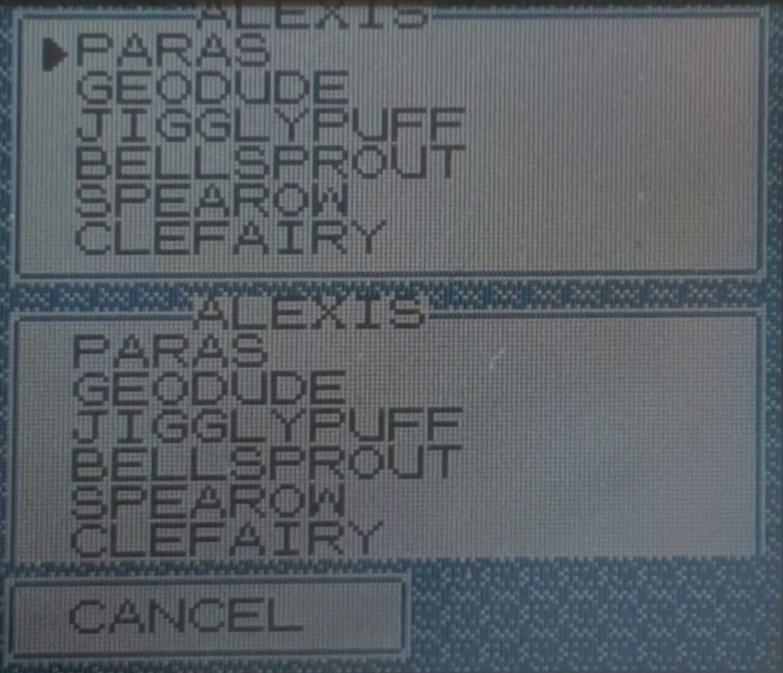
This step is almost exactly the same as the seed exchange but with a bigger payload. Immediately after exchanging seeds, the master will start sending several 0xFD as a preamble, and again, the slave must also reply with 0xFD or else the other side will be stuck waiting forever.
The exchange will start after the first non 0xFD byte appears and a total of 415 bytes will be exchanged.
There’s only one restriction: The payload must not contain 0xFE. 0xFE means that there is no more data to be exchanged, i’m not exactly sure how it works internally, but once the exchange ends the other side will just ignore that byte and the rest of the payload will be shifted by one, messing up everything after that 0xFE.
What happens when 0xFE is part of the payload? It needs to be patched (see Patch Section). To keep it simple for now: Each 0xFE byte is replaced with 0xFF before being sent.
A normal exchange (Preamble + 415 bytes):
| #MSG | MASTER | SLAVE |
|---|---|---|
| X-10 | 0xFD | 0x00 |
| X-9 | 0xFD | 0xFD |
| X-8 | 0xFD | 0xFD |
| ……. | …… | …. |
| X | 0x80 | 0xFD |
| X+1 | 0x88 | 0x82 |
| X+2 | 0x88 | 0x88 |
| X+3 | 0x95 | 0x90 |
| ……. | …… | …. |
| X+414 | 0x50 | 0x80 |
| X+415 | END | 0x50 |
| X+416 | END | END |
Data Structure
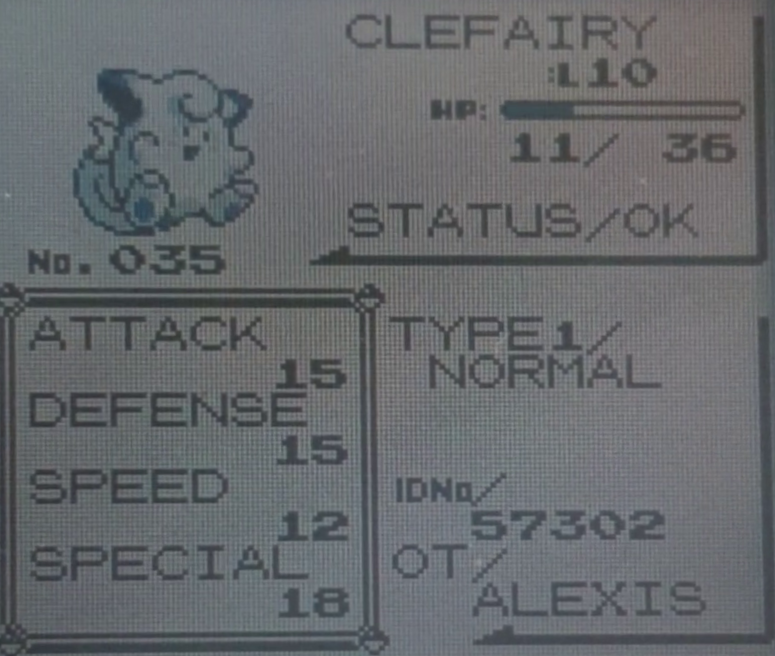
-
This is not part of the protocol per se, but it’s important to understand WHAT is being exchanged in those 415 bytes as it affects the final result.
-
There are many strings within that payload, they use custom encodings (not ASCII!), which depends on the game’s language (that’s why trading between games of different languages will break their save files!).
-
Those encodings are pretty well documented here: Bulbapedia-> Character Encoding (Generation I).
A few examples:
| Character | English Encoding | Japanese Encoding |
|---|---|---|
| A | 0x80 | 0x60 |
| B | 0x81 | 0x61 |
| a | 0xA0 | DOES NOT EXIST! |
| 5 | 0xFB | 0xFB |
| ポ | DOES NOT EXIST! | 0x43 |
Trainer Name
- Bytes [0:10] (first 11 Bytes) correspond with the trainer’s name which is displayed on the trade menu.
- The name itself is actually shorter, up to 10 bytes long, the extra byte is reserved for the string terminator (0x50 in any encoding).
- Characters after 0x50 are ignored, they’re usually 0x00.
- A 3 byte name will have 0x50 at its fourth byte (followed by 0x00 afterwards), whereas a 10 byte name will have 0x50 in the (reserved) eleventh byte.
- I haven’t tested what could happen if no string terminator is present or if we sent a 11 character string.
- THIS NAME CANNOT BE PATCHED. It cannot contain 0xFE (“8”), this can’t happen without cheats/glitches because the in-game’s keyboard doesn’t have any numbers! This means you can’t give a name with numbers to your player. (see Patch Section)
- IT CAN’T START WITH 0xFD (“7”) as it will be interpreted as part of the preamble, messing up everything that comes after! Same as above, names don’t usually contain numbers without cheats/glitches.
- IT CAN’T START WITH NULL CHARACTERS (0x00). Also an invalid name because not only it’s empty, but also its first character isn’t 0x50! Anyways, null characters will be interpreted as acknowledges and therefore skipped.
Party Size
- Byte [11]. This is only one byte with a value between 1 and 6. It specifies how many pokemon are there in the trainer’s party.
- It’s the only way of telling the other side that your party is smaller than 6, you have to exchange 415 bytes no matter how many pokemon you have! By specifying a smaller party size, the other peer will ignore the extra bytes (corresponding to non existing pokemon).
- [Glitch] if it’s bigger than expected (e.g: 6 when we only have 3 pokemon), the empty/random data corresponding to non existing party members will be interpreted as pokemon too!
- Things i haven’t tested:
- What happens if party size is 0.
- What happens if party size is greater than 6.
- What happens if it’s exactly 0xFE.
Pokemon Id List
- Bytes [12:19]. This is a fixed length list which contains up to 6 elements plus a terminator.
- It contains the id numbers of each pokemon in the party. The first id corresponds to the first pokemon in the party, the second id to the second pokemon, and so on..
- Id numbers are NOT the same as pokedex numbers. Pokemon in generation I have a hidden id number.
- A list of pokemon with their corresponding id numbers can be found here: Bulbapedia -> List of Pokemon by index number (Generation I).
- Note: Starting from generation II those hidden pokemon ids were replaced by the actual pokedex numbers (which makes more sense!).
- The list terminator (0xFF) goes after the id of last pokemon in the party.
- Parties with fewer than 6 pokemon will complete the list with that same terminator (0xFF).
- Values after the first list terminator are ignored, so it’s not strictly necessary to keep sending 0xFF, any value will do except 0xFE (Time Capsule in Gen II fills the remaining bytes with 0x00!).
- The statement above is only valid if the party size matches whatever is being sent here (e.g: a party of 3 should have 0xFF at the fourth byte).
- The party size indicates how many bytes have to be read from the list no matter what, so with an abnormally large party size the list terminator will be interpreted as another pokemon (and the bytes that follow it too!).
- [Glitch] If a pokemon with 0xFF as its id is being traded then it will become invisible (because 0xFF actually indicates the end of the list, which seems to be used when rendering pokemon names in the trade menu). However it is still selectable! (the selection cursor is able to go below the last displayed pokemon and ends up pointing at the corresponding blank space).
- Every pokemon below the one with 0xFF as its id will also become invisible but selectable (same reason, 0xFF indicates the end of the list)!
- [Glitch] Pokemon with 0xFE as their id will completely mess up the trade data, shifting it by one byte (for each 0xFE).
- THIS LIST CANNOT BE PATCHED. So 0xFE shouldn’t be sent (see above). That’s ok because there isn’t a valid pokemon whose id is 0xFE. (see Patch Section)
Some examples:
A full party (Venasaur, Rhydon, Seel, Mewtwo, Mew, Charmander):
| Byte | 0 | 1 | 2 | 3 | 4 | 5 | 6 |
|---|---|---|---|---|---|---|---|
| Value | 0x9A | 0x01 | 0x58 | 0x83 | 0x15 | 0x80 | 0xFF |
Party with a single pokemon (Bulbasaur):
| Byte | 0 | 1 | 2 | 3 | 4 | 5 | 6 |
|---|---|---|---|---|---|---|---|
| Value | 0x99 | 0xFF | 0xFF | 0xFF | 0xFF | 0xFF | 0xFF |
Same party but with random numbers after the first list terminator (unusual but still valid):
| Byte | 0 | 1 | 2 | 3 | 4 | 5 | 6 |
|---|---|---|---|---|---|---|---|
| Value | 0x99 | 0xFF | 0xDE | 0xCA | 0xF0 | 0xFA | 0xDE |
[Glitch] Party of 3 with 2 invisible pokemon (Bulbasaur, [invisible] ‘M, [invisible] Bulbasaur ):
| Byte | 0 | 1 | 2 | 3 | 4 | 5 | 6 |
|---|---|---|---|---|---|---|---|
| Value | 0x99 | 0xFF | 0x99 | 0xFF | 0xFF | 0xFF | 0xFF |
Pokemon Structure (x6)
Bytes [20:284] are 6 contiguous data structures (44 bytes long each). The structure itself describes the attributes of a single pokemon, so naturally there’s a structure for every pokemon in the player’s party.
If the player has less than 6 Pokemon, the remaining structures will be copies of the previous ones (E.G: A party of 2 will still have 6 structures but the last one will be repeated 4 times to replace the 4 missing pokemon: 1, 2, 2, 2, 2, 2). Those structures will be ignored anyway, so there’s no real need to repeat the last structure (any value will do).
[YELLOW ONLY]: Extra structures will be zero filled instead of being a copy of the last pokemon (44 zeroes for each structure).
Structures cannot contain 0xFE. but it CAN BE PATCHED (and it will be replaced by 0xFF). (see Patch Section)
A summary of the structure’s fields can be found here: Bulbapedia -> Pokemon data structure (Generation I).
I’ll also describe them here:
- [0] Pokemon species Id: As mentioned in Pokemon Id List each gen I pokemon has a hidden id which is different from its pokedex number (gen II just uses pokedex numbers). It should match with the one provided in the Pokemon Id List.
- Hybrid Pokemon: If this id differs from the one in the id list this pokemon becomes an unstable hybrid (Bulbapedia -> Unstable Hybrid Pokemon. This field corresponds to the recipient species, which is the “real” value. The value in the id list is the donor species.
- [1:2] Current HP (2 bytes, big endian, unsigned). Its value goes from 0 to 65535, it can even be higher than the pokemon’s max HP without any problem.
- [3] Box Level: From 0 to 255. This is NOT the actual pokemon level, i think that it’s the level value displayed when browsing pokemon on Bill’s PC. It can be completely ignored.
- [4] Status Condition: Each bit represents a status, i could only find information on the meaning of 5 out of 8 bits (SLP, PSN, BRN, FRZ, PAR. Check the Bulbapedia link above) and i don’t know what happens when multiple statuses are present at the same time.
- I suspect the missing statuses are confusion, badly poisoned, and leech seeded (which cannot happen outside battles).
| Bits | 7 | 6 | 5 | 4 | 3 | 2 | 1 | 0 |
|---|---|---|---|---|---|---|---|---|
| Value | PAR | FRZ | BRN | PSN | SLP | ??? | ??? | ??? |
- [5] and [6] Type 1 and Type 2:
- Pokemon with only one type will have both types set to the same value.
- Types are overridden by the default type of the pokemon species. So if you tried to send a fire/psychic type Bulbasaur, the other gameboy will just ignore those bytes and just show a grass/poison Bulbasaur. It’s not a display bug, this change is permanent! When trading back that same Bulbasaur we will see that the typing bytes were reverted to their default values.
- There are 255 available types, most of which are glitch types. Some glitch types share the same name as valid types!
- The only way to obtain a glitch type pokemon by trading is to receive a glitch pokemon that coincidentally has a glitch type by default. (Non default types are ignored, read above)
- A complete list of valid types can be found on the Bulbapedia link.
- [7] Catch Rate: From 0 to 255, every pokemon species has a fixed catch rate, this value won’t change even when that pokemon evolves. It represents an item in gen II so by modifying this value you could trade a pokemon holding (almost) any item to a gen II game.
- [8], [9], [10], [11]: Id of moves 1, 2, 3, and 4. Gen I only has 165 valid moves (1-165). Id 0 means EMPTY. Ids > 165 are glitch moves.
- [Glitch] Sending a pokemon with any moves AFTER an empty move will cause the game to recognize that empty id as a glitch move! Normally empty moves are at the end of the move menu, here we’re forcing an empty move to go above a non empty move.
- Pokemon with no moves can be traded.
- Pokemon with repeated moves can be traded.
- Moves have hardcoded types, categories(physical/special/status), power, accuracy, and max PP depending on the id.
- A complete list of valid moves for each generation can be found here: Bulbapedia -> List of moves.
- [12:13] Original Trainer ID (2 bytes, big endian, unsigned): This is the id of the trainer which caught this pokemon, it is used to check whether you’re the original owner of it or not (it may not obey you depending on lvl/badges obtained). Pokemon belonging to other trainers also gain more experience per battle.
- [14:16] Experience Points (3 bytes, big endian, unsigned): Total experience gained, goes from 0 to 16777215. Pokemon need to reach a certain amount of experience in order to level up, having a higher amount of experience than required for that level may prevent your pokemon from leveling entirely (i haven’t tested it yet).
- Experience points necessary to level up depend on the experience category of the pokemon species: Bulbapedia -> List of Pokemon by experience type.
- Experience formulas can be found here: Bulbapedia -> Experience -> Relation to level
- [17:18], [19:20], [21:22], [23:24], [25:26]: Effort Values (EVs) for Health, Attack, Defense, Speed, and Special (2 bytes each, big endian, unsigned).
- They’re basically experience points for each stat. The final value of the stats will slightly increase when their EV’s are high enough.
- They’re gained when defeating other pokemon (based on its stats).
- EVs are ignored on traded pokemon until you deposit and withdraw them. This forces the game to recalculate pokemon stats. (see Bulbapedia -> Box Trick).
-
- Each stat IV consists in 4 bits, so naturally the 4 IV stats will occupy 16 bits / 2 bytes.
- Health IV is calculated from the IVs of the other stats. Specifically, the last bit of each stat.
Here’s an example:
| Bits: | 15 | 14 | 13 | 12 | 11 | 10 | 9 | 8 | 7 | 6 | 5 | 4 | 3 | 2 | 1 | 0 |
| IV Stat: | Attack | Defense | Speed | Special | ||||||||||||
| Values: | 1 | 1 | 1 | 1 | 0 | 0 | 0 | 0 | 1 | 0 | 1 | 0 | 1 | 1 | 0 | 0 |
| Decimal: | 15 | 0 | 10 | 12 | ||||||||||||
- Note that Health IV is calculated by concatenating bits 12, 8, 4, 0. In the example above we have: 1, 0, 0, 0, therefore Health IV = 1000 = 8
- To be shiny, a Pokemon’s Defense, Speed, and Special IVs must be 10, its Attack IV can be any of the following values: 2, 3, 6, 7, 10, 11, 14 or 15. Bulbapedia -> Shiny Pokemon (Generation II)
- Their gender will depend on their Attack IV and the male to female ratio of their species: Bulbapedia -> Gender (Generation II)
- [29], [30], [31], [32]: PP values for Moves 1, 2, 3, 4. The 2 most significant bits represent the amount of PP UPs used on that move (0, 1, 2, or 3). The lowest 6 bits represent the current amount of PP for that move (from 0 to 63).
- This Value shouldn’t matter for empty moves (id 0)
- [Glitch] Glitched empty moves (id 0 with non-empty moves below them) will honor this value!
- Remaining PP can actually be higher than the move’s MAX PP (which shouldn’t happen under normal circumstances).
- A move’s MAX PP depends on their base PP (which is hardcoded) and how much PP UPs they have: Bulbapedia -> PP UP.
An example PP Value:
| Bits: | 7 | 6 | 5 | 4 | 3 | 2 | 1 | 0 |
| Meaning: | PP UPs | Remaining PP | ||||||
| Values: | 1 | 0 | 1 | 0 | 0 | 1 | 0 | 1 |
| Decimal: | 2 | 37 | ||||||
- [33] Level: This is the real level value (as opposed to the box level [3]). It ranges from 0 to 255, although levels 0, 1 and levels above 100 can only be reached through glitches (‘member missingNo?):
- A pokemon should have enough experience points ([14:16]) to reach its level, otherwise it won’t level up until it does: A level 99 pokemon with 0 experience will have to grind the same amount of experience as a level 1 pokemon to reach level 100!
- [34:35], [36:37], [38:39], [40:41], [42:43]: Stat Values for Health (i.e. maximum health), Attack, Defense, Speed, Special. They can be anywhere between 0 and 65535, however their real value is calculated using the pokemon’s base stats (hardcoded), level, EVs and IVs: Bulbapedia -> Stat (Generations I and II)
- Once the pokemon is stored and then withdrawn from a PC box, its stats will be recalculated, overridding any previous value. Pokemon Stadium will also recalculate stats when registering pokemon into a team.
- It’s better to modify EVs and IVs to obtain higher (and valid!) stats.
Original Owner Name (x6)
- This is the name of the trainer who caught this pokemon (that’s why it’s named original owner). It’s used along with the Original Trainer’s ID in order to determine if the current player is the original owner of this pokemon. There’re some advantages to being the original owner of a pokemon (it will obey you no matter what!) and a disadvantage (they will gain xp at a standard rate while not owned pokemon will get bonus xp per battle).
- It’s a string, so it’s almost the same as Trainer Name: Uses custom a encoding (not ASCII), 11 bytes, max length of 10, terminates with 0x50, bytes following 0x50 are usually 0x00:
- It cannot contain 0xFE but this time it CAN BE PATCHED. (see Patch Section)
- Something interesting that i have found is that the encoding allows some words to be encoded as one byte. For example 0x5D represents the string “TRAINER”, so it’s possible to have names longer than 10 if we use those special words: 0x5D5D5D5D5D5D5D5D5D5D50 is a valid name as it only occupies 10 bytes, but it’s actually 70 characters long!
- There’s one in-game trade which gives you a Mr.Mime nicknamed “Marcel”, its original owner’s name is “TRAINER” encoded as a single 0x5D (followed by the 0x50 terminator)!
- If the party is smaller than 6, the remaining fields will be a copy of the last one (if there’s only 1 pokemon, then all of the 6 fields will be the same!).
- It shouldn’t really matter because extra fields are ignored. They could have any value.
- [YELLOW ONLY]: Sends zeroes instead of repeating the last name.
Examples:
| Byte | 10 | 9 | 8 | 7 | 6 | 5 | 4 | 3 | 2 | 1 | 0 |
|---|---|---|---|---|---|---|---|---|---|---|---|
| Value | 0x80 | 0x8B | 0x84 | 0x97 | 0x88 | 0x92 | 0x50 | 0x00 | 0x00 | 0x00 | 0x00 |
| Char | A | L | E | X | I | S | \0 | NULL | NULL | NULL | NULL |
Using the maximum length (10 bytes)
| Byte | 10 | 9 | 8 | 7 | 6 | 5 | 4 | 3 | 2 | 1 | 0 |
|---|---|---|---|---|---|---|---|---|---|---|---|
| Value | 0x80 | 0x8B | 0x84 | 0x97 | 0x88 | 0x92 | 0x80 | 0x8B | 0x84 | 0x97 | 0x50 |
| Char | A | L | E | X | I | S | A | L | E | X | \0 |
Word encoded in a single byte:
| Byte | 10 | 9 | 8 | 7 | 6 | 5 | 4 | 3 | 2 | 1 | 0 |
|---|---|---|---|---|---|---|---|---|---|---|---|
| Value | 0x5D | 0x50 | 0x00 | 0x00 | 0x00 | 0x00 | 0x00 | 0x00 | 0x00 | 0x00 | 0x00 |
| Char | TRAINER | \0 | NULL | NULL | NULL | NULL | NULL | NULL | NULL | NULL | NULL |
Pokemon Nickname (x6)
- This is the pokemon’s nickname if it has one. Otherwise the name must match the name of the pokemon species (E.G. A Bulbasaur with no nickname should have “BULBASAUR” on this field)
- Also 11 bytes long, terminated with 0x50, uses the same encoding.
- It can also be patched. (see Patch Section)
- Same behavior if the party is less than 6 (repeats last name until 6 fields are sent)
- [YELLOW ONLY] Sends zeroes instead of repeating the last name if party is less than 6.
- The only difference is that every character after 0x50 is also 0x50 (i’m no sure why, maybe an oversight or a way to differentiate a nickname from the species name).
Examples:
Pokemon name using 0x50 after the first 0x50 (NO NICKNAME)
| Byte | 10 | 9 | 8 | 7 | 6 | 5 | 4 | 3 | 2 | 1 | 0 |
|---|---|---|---|---|---|---|---|---|---|---|---|
| Value | 0x8C | 0x84 | 0x96 | 0x50 | 0x50 | 0x50 | 0x50 | 0x50 | 0x50 | 0x50 | 0x50 |
| Char | M | E | W | \0 | \0 | \0 | \0 | \0 | \0 | \0 | \0 |
Pokemon name using all the available bytes (NO NICKNAME)
| Byte | 10 | 9 | 8 | 7 | 6 | 5 | 4 | 3 | 2 | 1 | 0 |
|---|---|---|---|---|---|---|---|---|---|---|---|
| Value | 0x81 | 0x94 | 0x93 | 0x93 | 0x84 | 0x91 | 0x85 | 0x91 | 0x84 | 0x84 | 0x50 |
| Char | B | U | T | T | E | R | F | R | E | E | \0 |
A nickname
| Byte | 10 | 9 | 8 | 7 | 6 | 5 | 4 | 3 | 2 | 1 | 0 |
|---|---|---|---|---|---|---|---|---|---|---|---|
| Value | 0x80 | 0x8B | 0x84 | 0x97 | 0x88 | 0x92 | 0x50 | 0x00 | 0x00 | 0x00 | 0x00 |
| Char | A | L | E | X | I | S | \0 | NULL | NULL | NULL | NULL |
Owned Pokemon Bytes (x3)
-
There’re 3 more bytes before the patch section. They’re basically useless as they represent incomplete data and have nothing to do with the trade itself!
-
The games store pokedex data (owned pokemon and seen pokemon) as an array of bytes, each bit representing a pokemon. When a bit is set to 1 then that pokemon is owned (or seen).
-
The owned pokemon array starts immediately after the player’s party data.
- When exchanging party data, for some reason (probably a mistake) 3 extra bytes are sent, which belong to the first 3 bytes of the player’s owned pokemon array:
- To be precise, those bytes indicate if the player owns (or not) the first 24 pokemon of the pokedex.
- 0xFE can be sent in this section, so i’m assuming that this part doesn’t need to be patched (or the game doesn’t care about it).
As an example, if the player only owned Bulbasaur, Metapod, and Spearrow, then those 3 bytes would be:
| Byte | 1 | 2 | 3 |
|---|---|---|---|
| Bin | 00000001 | 00000100 | 00010000 |
| Hex | 0x01 | 0x04 | 0x10 |
Patch Section
At this point both players have already transferred their payloads (which contained information about them and their pokemon). Those payloads couldn’t contain 0xFE as this byte will be ignored by the other peer, shifting the rest of the payload by one byte for each 0xFE encountered.
As you may have seen in the previous section Data Structure, some (if not all) pokemon properties can end up containing that value, some examples are:
- Current/Max HP being 254 (0x00FE), 510 (0x01FE), 766 (0x02FE), 1022 (0x03FE), and so on. Also any value above 65024 (0xFE00), which can only be obtained by cheating.
- Same with stats EVs (which are basically experience points for stats, 2 bytes each).
- Same with Attack/Defense/Speed/Special stats but their values are usually lower than 254.
- Trainer ID: It’s randomly generated when starting a new game so you could end up with any of the values above.
- Experience points, 254, 510, 766, 1022… any value between 65024 (0x00FE00) and 65279 (0x00FEFF), also 65790 (0x0100FE), anything above 16646144 (0xFE0000), etc.
- Stats IVs: Attack IV = 15 and Defense IV = 14 (1111 1110 = 0xFE), or Speed IV = 15 and Special IV = 14.
- Level: 254 but can only be reached with cheats/glitches.
Some properties can contain 0xFE in their values, but are restricted by in-game mechanics from doing so. I think that those restrictions were intentionally implemented for this purpose. Otherwise they don’t make any sense:
-
PP Values: Can theoretically reach 0xFE (3 PP ups and 62 PP remaining 11 111110, 3 62 = 0xFE) BUT the games restrict max PP values to 61. - Names (Original Trainer / Pokemon Nicknames): 0xFE represents the character ‘8’ which cannot be legally present (in-game keyboards do not have numbers!).
Players need to send their payloads even if they contain 0xFE, so they patch them: First, every instance of 0xFE is replaced with 0xFF (unless specified otherwise in Data Structure) before being sent. Now, both players will send a list of offsets that specify which bytes need to be changed back into 0xFE.
Preamble
Just as in Seed Exchange and Party Information Exchange, a preamble consisting in multiple 0xFD bytes is sent (usually 6 bytes), after that another stream of bytes is exchanged, this time it’s 0x00. The first non 0x00 byte marks the start of the patch list.
What a normal patch section preamble looks like:
| #MSG | MASTER | SLAVE |
|---|---|---|
| X | 0xFD | 0x00 |
| X+1 | 0xFD | 0xFD |
| X+2 | 0xFD | 0xFD |
| X+3 | 0xFD | 0xFD |
| X+4 | 0xFD | 0xFD |
| X+5 | 0xFD | 0xFD |
| X+6 | 0x00 | 0xFD |
| X+7 | 0x00 | 0x00 |
| X+8 | 0x00 | 0x00 |
| X+9 | 0x00 | 0x00 |
| X+10 | 0x00 | 0x00 |
| X+11 | 0x00 | 0x00 |
| X+12 | 0x00 | 0x00 |
| X+13 | PATCH | 0x00 |
| X+14 | PATCH | PATCH |
Stages
A patch list should indicate which bytes in the party information payload (Party Information Exchange) are actually 0xFE, that value couldn’t be sent due to restrictions in the protocol (it is a control byte) so it was replaced with 0xFF and now needs to be changed back!
The simplest solution would be to send a list of offsets, each one pointing to a byte in the payload, and that byte would need to be changed back into 0xFE.
Now, remember that the payload is 415 bytes long. 1 byte per offset is not enough (goes from 0 to 255) so to represent any offset within the payload we would need 2 bytes which are way overkill as they can represent any value between 0 to 65535. It also wastes a lot of memory and increases the transfer time (due to bigger list items).
The games solve this issue by logically splitting the payload in 2, and then sending 2 patch lists, each one containing byte sized offsets which point to either the first or second half of the payload.
- The first list, which points to the first half of the payload is considered Stage 1 of the patch section, while the second list (pointing to the second half) will be Stage 2.
- The byte 0xFF is used to mark the end of the lists. So an empty list will be just [0xFF], and a list with only one element will be [0xYY, 0xFF].
- Lists cannot contain offsets with the following values:
- 0x00: Represents NULL data, sent after the end of the list (as a fill-byte).
- 0xFD: Control byte. Preamble.
- 0xFE: Control byte. Indicates that there’s nothing to send (or not ready).
- 0xFF: Control byte. Indicates the end of the list.
- This leaves us with a range of 1-252 (0xFC), so offsets start at 1 (not 0).
- Stage 1 offsets start at the first byte of the first pokemon in the party (Byte 19 of the payload) (Pokemon Structure (x6)). That’s why anything before that couldn’t be patched
- Stage 2 offsets start exactly 252 bytes after that (Byte 271 of the payload). At the sixth pokemon’s 4th move’s PP values.
Here's a complete payload, byte values represent their corresponding offset:
Note: **||** Separates stage 1 and 2. Bytes marked as **XX** are unpatchable.
0xXX, 0xXX, 0xXX, 0xXX, 0xXX, 0xXX, 0xXX, 0xXX, 0xXX, 0xXX, 0xXX, # Trainer Name
0xXX, # Party Size
0xXX, 0xXX, 0xXX, 0xXX, 0xXX, 0xXX, # Party Species list
0xXX, # List terminator
# ----------------- POKEMON 1 -----------------
0x01, # Species
0x02, 0x03, # Current HP
0x04, # Box Level
0x05, # Statuses (bit array)
0x06, # Type 1
0x07, # Type 2
0x08, # Catch Rate / Held Item
0x09, # Move 1
0x0A, # Move 2
0x0B, # Move 3
0x0C, # Move 4
0x0D, 0x0E, # Original Trainer ID
0x0F, 0x10, 0x11, # Experience Points
0x12, 0x13, # Health EV
0x14, 0x15, # Attack EV
0x16, 0x17, # Defense EV
0x18, 0x19, # Speed EV
0x1A, 0x1B, # Special EV
0x1C, 0x1D, # IV Data
0x1E, # Move 1 PP
0x1F, # Move 2 PP
0x20, # Move 3 PP
0x21, # Move 4 PP
0x22, # Level
0x23, 0x24, # Max HP
0x25, 0x26, # Attack
0x27, 0x28, # Defense
0x29, 0x2A, # Speed
0x2B, 0x2C, # Special
# ----------------- POKEMON 2 -----------------
0x2D, # Species
0x2E, 0x2F, # Current HP
0x30, # Box Level
0x31, # Statuses (bit array)
0x32, # Type 1
0x33, # Type 2
0x34, # Catch Rate / Held Item
0x35, # Move 1
0x36, # Move 2
0x37, # Move 3
0x38, # Move 4
0x39, 0x3A, # Original Trainer ID
0x3B, 0x3C, 0x3D, # Experience Points
0x3E, 0x3F, # Health EV
0x40, 0x41, # Attack EV
0x42, 0x43, # Defense EV
0x44, 0x45, # Speed EV
0x46, 0x47, # Special EV
0x48, 0x49, # IV Data
0x4A, # Move 1 PP
0x4B, # Move 2 PP
0x4C, # Move 3 PP
0x4D, # Move 4 PP
0x4E, # Level
0x4F, 0x50, # Max HP
0x51, 0x52, # Attack
0x53, 0x54, # Defense
0x55, 0x56, # Speed
0x57, 0x58, # Special
# ----------------- POKEMON 3 -----------------
0x59, # Species
0x5A, 0x5B, # Current HP
0x5C, # Box Level
0x5D, # Statuses (bit array)
0x5E, # Type 1
0x5F, # Type 2
0x60, # Catch Rate / Held Item
0x61, # Move 1
0x62, # Move 2
0x63, # Move 3
0x64, # Move 4
0x65, 0x66, # Original Trainer ID
0x67, 0x68, 0x69, # Experience Points
0x6A, 0x6B, # Health EV
0x6C, 0x6D, # Attack EV
0x6E, 0x6F, # Defense EV
0x70, 0x71, # Speed EV
0x72, 0x73, # Special EV
0x74, 0x75, # IV Data
0x76, # Move 1 PP
0x77, # Move 2 PP
0x78, # Move 3 PP
0x79, # Move 4 PP
0x7A, # Level
0x7B, 0x7C, # Max HP
0x7D, 0x7E, # Attack
0x7F, 0x80, # Defense
0x81, 0x82, # Speed
0x83, 0x84, # Special
# ----------------- POKEMON 4 -----------------
0x85, # Species
0x86, 0x87, # Current HP
0x88, # Box Level
0x89, # Statuses (bit array)
0x8A, # Type 1
0x8B, # Type 2
0x8C, # Catch Rate / Held Item
0x8D, # Move 1
0x8E, # Move 2
0x8F, # Move 3
0x90, # Move 4
0x91, 0x92, # Original Trainer ID
0x93, 0x94, 0x95, # Experience Points
0x96, 0x97, # Health EV
0x98, 0x99, # Attack EV
0x9A, 0x9B, # Defense EV
0x9C, 0x9D, # Speed EV
0x9E, 0x9F, # Special EV
0xA0, 0xA1, # IV Data
0xA2, # Move 1 PP
0xA3, # Move 2 PP
0xA4, # Move 3 PP
0xA5, # Move 4 PP
0xA6, # Level
0xA7, 0xA8, # Max HP
0xA9, 0xAA, # Attack
0xAB, 0xAC, # Defense
0xAD, 0xAE, # Speed
0xAF, 0xB0, # Special
# ----------------- POKEMON 5 -----------------
0xB1, # Species
0xB2, 0xB3, # Current HP
0xB4, # Box Level
0xB5, # Statuses (bit array)
0xB6, # Type 1
0xB7, # Type 2
0xB8, # Catch Rate / Held Item
0xB9, # Move 1
0xBA, # Move 2
0xBB, # Move 3
0xBC, # Move 4
0xBD, 0xBE, # Original Trainer ID
0xBF, 0xC0, 0xC1, # Experience Points
0xC2, 0xC3, # Health EV
0xC4, 0xC5, # Attack EV
0xC6, 0xC7, # Defense EV
0xC8, 0xC9, # Speed EV
0xCA, 0xCB, # Special EV
0xCC, 0xCD, # IV Data
0xCE, # Move 1 PP
0xCF, # Move 2 PP
0xD0, # Move 3 PP
0xD1, # Move 4 PP
0xD2, # Level
0xD3, 0xD4, # Max HP
0xD5, 0xD6, # Attack
0xD7, 0xD8, # Defense
0xD9, 0xDA, # Speed
0xDB, 0xDC, # Special
# ----------------- POKEMON 6 -----------------
0xDD, # Species
0xDE, 0xDF, # Current HP
0xE0, # Box Level
0xE1, # Statuses (bit array)
0xE2, # Type 1
0xE3, # Type 2
0xE4, # Catch Rate / Held Item
0xE5, # Move 1
0xE6, # Move 2
0xE7, # Move 3
0xE8, # Move 4
0xE9, 0xEA, # Original Trainer ID
0xEB, 0xEC, 0xED, # Experience Points
0xEE, 0xEF, # Health EV
0xF0, 0xF1, # Attack EV
0xF2, 0xF3, # Defense EV
0xF4, 0xF5, # Speed EV
0xF6, 0xF7, # Special EV
0xF8, 0xF9, # IV Data
0xFA, # Move 1 PP
0xFB, # Move 2 PP
0xFC, # Move 3 PP
||||||||||||||||||||||||||||||||||||||||||||||||||||||||||||||||||||||||||||||||| # STAGE 2
0x01, # Move 4 PP
0x02, # Level
0x03, 0x04, # Max HP
0x05, 0x06, # Attack
0x07, 0x08, # Defense
0x09, 0x0A, # Speed
0x0B, 0x0C, # Special
0x0D, 0x0E, 0x0F, 0x10, 0x11, 0x12, 0x13, 0x14, 0x15, 0x16, 0x17, # Pokemon 1 Original Trainer Name
0x18, 0x19, 0x1A, 0x1B, 0x1C, 0x1D, 0x1E, 0x1F, 0x20, 0x21, 0x22, # Pokemon 2 Original Trainer Name
0x23, 0x24, 0x25, 0x26, 0x27, 0x28, 0x29, 0x2A, 0x2B, 0x2C, 0x2D, # Pokemon 3 Original Trainer Name
0x2E, 0x2F, 0x30, 0x31, 0x32, 0x33, 0x34, 0x35, 0x36, 0x37, 0x38, # Pokemon 4 Original Trainer Name
0x39, 0x3A, 0x3B, 0x3C, 0x3D, 0x3E, 0x3F, 0x40, 0x41, 0x42, 0x43, # Pokemon 5 Original Trainer Name
0x44, 0x45, 0x46, 0x47, 0x48, 0x49, 0x4A, 0x4B, 0x4C, 0x4D, 0x4E, # Pokemon 6 Original Trainer Name
0x4F, 0x50, 0x51, 0x52, 0x53, 0x54, 0x55, 0x56, 0x57, 0x58, 0x59, # Pokemon 1 Nickname
0x5A, 0x5B, 0x5C, 0x5D, 0x5E, 0x5F, 0x60, 0x61, 0x62, 0x63, 0x64, # Pokemon 2 Nickname
0x65, 0x66, 0x67, 0x68, 0x69, 0x6A, 0x6B, 0x6C, 0x6D, 0x6E, 0x6F, # Pokemon 3 Nickname
0x70, 0x71, 0x72, 0x73, 0x74, 0x75, 0x76, 0x77, 0x78, 0x79, 0x7A, # Pokemon 4 Nickname
0x7B, 0x7C, 0x7D, 0x7E, 0x7F, 0x80, 0x81, 0x82, 0x83, 0x84, 0x85, # Pokemon 5 Nickname
0x86, 0x87, 0x88, 0x89, 0x8A, 0x8B, 0x8C, 0x8D, 0x8E, 0x8F, 0x90, # Pokemon 6 Nickname
0x91, 0x92, 0x93 # Owned Pokemon Bytes (Patchable?)
Restrictions
- The entire patch section (list 1 + list 2, including list terminators) has to be shorter than 190 bytes, that means that only 188 bytes can be patched without breaking the protocol:
- You can send only one list containing 190 offsets without a list terminator and the other side will allow it! (it does break the protocol but no one thought about this case).
- Furthermore, the second list terminator is entirely optional! Only the first one is used (to discriminate between the first and second stage).
- Note: The code actually uses a 200 byte buffer for the patch lists but for some reason the first 10 bytes are skipped (index starts at 10).
- Realistically, games wouldn’t be able to reach the 188 patch limit:
- A pokemon species cannot be 0xFE (Glitch pokemon ‘M).
- Their max HP (and current HP) can reach 254 (0x00FE) but not anywhere near 65024 (0xFE00), so only the lowest of the 2 HP bytes can contain 0xFE.
- Level and box level are capped at 100 (without glitches).
- Statuses could never be 0xFE (legally).
- Types 1 are 2 cannot be 0xFE (it is a glitch type).
- There isn’t any pokemon with a catch rate of 254, and 254 is an invalid item index (glitch item HM12).
- Move indexes only reach 165 (gen I) and 251 (gen I) so 254 is a glitch move.
- Moves PP values cannot reach 254 (would mean a 62 PP move with 3 PP UPs but the game caps PP at 61).
- Only the lowest byte of pokemon stats can reach 254 (without cheats).
- Trainer Names can’t contain numbers (‘8’ is encoded as 254).
- Nicknames can’t contain numbers (‘8’ is encoded as 254).
- Doing a rough (and generous) estimate, the games would need 180 bytes at the absolute worst case (without any glitches).
- Any offset after the patch limit is reached (188) won’t be sent (but could affect things on YOUR side, see Buffer Overflow):
- Games are hardcoded to always exchange the 190 bytes of the patch buffer even if there’s nothing to patch (0x00 is sent repeatedly in those cases).
Buffer Overflow
-
Anytime 0xFE is found in the payload its offset will be recorded in the patch buffer and that buffer’s index will be increased by 1. The buffer’s size is 200 but its index starts at 10, resulting in 190 available bytes for recording offsets.
-
If we manage to have more than 190 bytes to patch then the games will increase the buffer’s index beyond its maximum size, writing the extra offsets in unexpected memory regions (i think that the next 200 bytes belong to the enemy’s patch list, not sure what’s after that). The game’s code doesn’t validate index values, and there’s no memory protection!
-
We can potentially write 225 bytes, their values can be anything between 1 and 252, but we’re restricted to write strictly increasing sequences of values (one sequence per patch stage, the lowest value for the first sequence being 191).
Note: Another thing we could do is to force the other player to write 0xFE in a memory region which doesn’t belong to their received payload: The second patch list can have any offset value between 1 and 252 but the actual patchable payload is 147 bytes long (which is the remaining second half, take a look at the offsets at the Stages section). If we sent a malicious patch list with offsets higher than 0x93, then the other gameboy will happily write 0xFE in a memory area which is beyond the payload to be patched. 106 Bytes after the payload area can be written (offsets 0x94 to 0xFC).
Examples
Empty patch list for both master and slave:
| #MSG | MASTER | SLAVE |
|---|---|---|
| X | 0xFF | 0x00 |
| X+1 | 0xFF | 0xFF |
| X+2 | 0x00 | 0xFF |
| X+3 | 0x00 | 0x00 |
| X+4 | 0x00 | 0x00 |
| X+5 | 0x00 | 0x00 |
| X+6 | 0x00 | 0x00 |
| ……… | …….. | …… |
| X+184 | 0x00 | 0x00 |
| X+185 | 0x00 | 0x00 |
| X+186 | 0x00 | 0x00 |
| X+187 | 0x00 | 0x00 |
| X+188 | 0x00 | 0x00 |
| X+189 | 0x00 | 0x00 |
| X+190 | 0x00 | 0x00 |
Master patching 3 bytes of the first stage (offsets 0x01, 0x95, 0xFC), slave has nothing to patch:
| #MSG | MASTER | SLAVE |
|---|---|---|
| X | 0x01 | 0x00 |
| X+1 | 0x95 | 0xFF |
| X+2 | 0xFC | 0xFF |
| X+3 | 0xFF | 0x00 |
| X+4 | 0xFF | 0x00 |
| X+5 | 0x00 | 0x00 |
| X+6 | 0x00 | 0x00 |
| ……… | …….. | …… |
| X+184 | 0x00 | 0x00 |
| X+185 | 0x00 | 0x00 |
| X+186 | 0x00 | 0x00 |
| X+187 | 0x00 | 0x00 |
| X+188 | 0x00 | 0x00 |
| X+189 | 0x00 | 0x00 |
| X+190 | 0x00 | 0x00 |
Master patching 5 bytes of the second stage, slave patching a single byte from the first stage:
| #MSG | MASTER | SLAVE |
|---|---|---|
| X | 0xFF | 0x00 |
| X+1 | 0x02 | 0xFF |
| X+2 | 0x46 | 0xAA |
| X+3 | 0x67 | 0xFF |
| X+4 | 0x8A | 0x00 |
| X+5 | 0x8F | 0x00 |
| X+6 | 0xFF | 0x00 |
| ……… | …….. | …… |
| X+184 | 0x00 | 0x00 |
| X+185 | 0x00 | 0x00 |
| X+186 | 0x00 | 0x00 |
| X+187 | 0x00 | 0x00 |
| X+188 | 0x00 | 0x00 |
| X+189 | 0x00 | 0x00 |
| X+190 | 0x00 | 0x00 |
Master patching 1 byte of each stage (note the 0x02 in both sections, they belong to different parts of the payload), slave patching 2 bytes of each stage:
| #MSG | MASTER | SLAVE |
|---|---|---|
| X | 0x02 | 0x00 |
| X+1 | 0xFF | 0xAA |
| X+2 | 0x02 | 0xBB |
| X+3 | 0xFF | 0xFF |
| X+4 | 0x00 | 0x01 |
| X+5 | 0x00 | 0x02 |
| X+6 | 0x00 | 0xFF |
| ……… | …….. | …… |
| X+184 | 0x00 | 0x00 |
| X+185 | 0x00 | 0x00 |
| X+186 | 0x00 | 0x00 |
| X+187 | 0x00 | 0x00 |
| X+188 | 0x00 | 0x00 |
| X+189 | 0x00 | 0x00 |
| X+190 | 0x00 | 0x00 |
Master using the entire patch area! (186 offsets in section 1, 3 offsets in section 2).
| #MSG | MASTER | SLAVE |
|---|---|---|
| X | 0x01 | 0x00 |
| X+1 | 0x02 | 0xFF |
| X+2 | 0x03 | 0xFF |
| X+3 | 0x04 | 0x00 |
| X+4 | 0x05 | 0x00 |
| X+5 | 0x06 | 0x00 |
| X+6 | 0x07 | 0x00 |
| ……… | …….. | …… |
| X+184 | 0xB7 | 0x00 |
| X+185 | 0xB8 | 0x00 |
| X+186 | 0xFF | 0x00 |
| X+187 | 0x01 | 0x00 |
| X+188 | 0x02 | 0x00 |
| X+189 | 0x03 | 0x00 |
| X+190 | 0xFF | 0x00 |
Trade Request
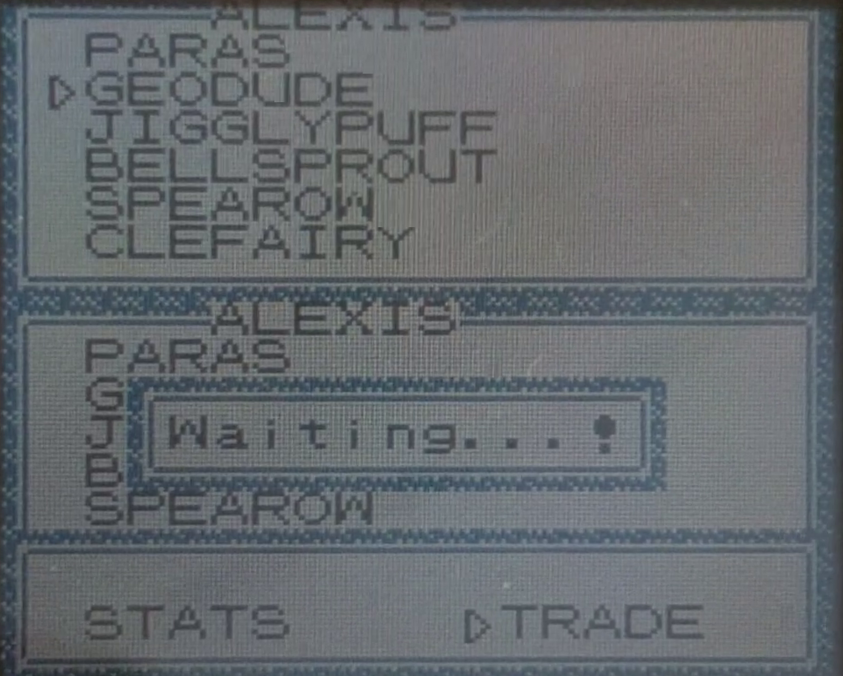
-
Here, both players are in the trade menu, they can see the properties of each pokemon (in both parties) and may offer to send any of their pokemon to the opposing player. They may also exit the menu at any moment.
-
Seeing pokemon properties won’t trigger any exchange as the entire party data had already been exchanged.
-
The slave gameboy will have to wait for the master to make a choice (because slaves can’t initiate an exchange on their own). If the slave chooses something first it’ll keep waiting for the master (there’s not timeout).
-
Once the master offers a pokemon (or exits the menu) it will repeatedly send that action until the slave also chooses to do something (there’s no timeout).
-
When both players select an action the master will send several 0x00 to acknowledge the selections. The slave will also respond with an acknowledge.
-
Actions are encoded as 0x6X, where X is the party index of the selected pokemon (0 to 5).
-
0x6F represents the exit menu action, if both players choose that option they’ll return to the [Players Ready for Trade] stage.
-
If only one player chooses to exit while the other one chose to trade something, then the selection process will reset and both players will have to make a new choice.
-
GLITCH: Players can send indexes higher than their party sizes (e.g index 3 on a party of size 2, or even index 14 (0x6E)). If the index is less than 6 then players will interpret it as the last pokemon of the sender’s party (the last pokemon is repeated until 6 pokemon structures are sent). Indexes higher than 5 will trigger an out of bounds memory read which will interpret those random 44 bytes as a pokemon.
- For example, an index of 10 will read 44 bytes starting at index 440 (10*44). This invalid memory read happens in both games.
- I’m not sure what would happen if that glitch “pokemon” was traded (the bytes at that memory location will be copied/moved, and overwritten!), it may break both games.
Examples:
Master keeps sending its action for a long time until the slave chooses what to do:
| #MSG | MASTER | SLAVE |
|---|---|---|
| X | ACTION | 0x00 |
| X+1 | ACTION | 0x00 |
| X+2 | ACTION | 0x00 |
| ……. | …… | …. |
| X+400000 | ACTION | 0x00 |
| X+400001 | ACTION | 0x00 |
| X+400002 | ACTION | 0x00 |
| X+400003 | ACTION | ACTION |
| X+400004 | ACTION | ACTION |
| X+400005 | ACTION | ACTION |
| X+400006 | ACTION | ACTION |
| ……. | …… | …. |
| X+400016 | ACTION | ACTION |
| X+400017 | 0x00 | ACTION |
| X+400018 | 0x00 | 0x00 |
| X+400019 | 0x00 | 0x00 |
| X+400020 | 0x00 | 0x00 |
| X+400021 | 0x00 | 0x00 |
| X+400022 | 0x00 | 0x00 |
| X+400023 | CONFIRMATION | CONFIRMATION |
Master chooses to trade its 4th pokemon but slave exits the menu:
| #MSG | MASTER | SLAVE |
|---|---|---|
| X | 0x63 | 0x00 |
| X+1 | 0x63 | 0x00 |
| X+2 | 0x63 | 0x6F |
| X+3 | 0x63 | 0x6F |
| ……. | …… | …. |
| X+15 | 0x63 | 0x6F |
| X+16 | 0x00 | 0x6F |
| X+17 | 0x00 | 0x00 |
| ……. | …… | …. |
| X+24 | 0x00 | 0x00 |
| X+25 | AT TRADE MENU | AT TRADE MENU |
Master chooses to trade its 2nd pokemon, slave chooses its 3rd pokemon:
| #MSG | MASTER | SLAVE |
|---|---|---|
| X | 0x61 | 0x00 |
| X+1 | 0x61 | 0x62 |
| X+2 | 0x61 | 0x62 |
| X+3 | 0x61 | 0x62 |
| ……. | …… | …. |
| X+14 | 0x61 | 0x62 |
| X+15 | 0x00 | 0x62 |
| X+16 | 0x00 | 0x00 |
| X+17 | 0x00 | 0x00 |
| ……. | …… | …. |
| X+24 | 0x00 | 0x00 |
| X+25 | CONFIRMATION | CONFIRMATION |
Trade Confirmation
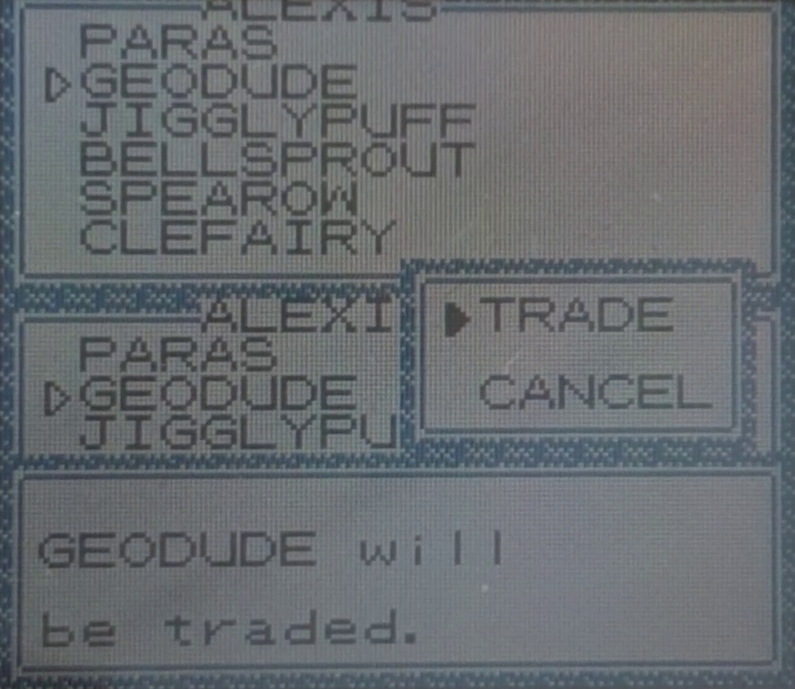
-
Once both players chose to send one of their pokemon, a confirmation dialog will appear. They can either start the trade or cancel:
- (Slave only) 0x00 is sent when still deciding what to do.
- 0x61 is sent when cancelling the trade.
- 0x62 is sent when confirming the trade.
- The master will repeatedly send its choice until the slave also chooses something, otherwise it’ll respond with 0x00. There’s no timeout.
- If the master hasn’t decided yet, the slave will wait for it forever (there’s no timeout).
-
Once both players have decided, they’ll keep sending their choices (usually 14 times), followed by a stream of 0x00 (usually 9 times).
-
If either one cancels the trade while the other one confirmed it, then both will return to the trade menu and pick a new pokemon to send (or exit).
- When both players confirm the trade, the trading process will start.
Some examples:
Master (CANCEL) waited a long time for the slave to decide (CONFIRM):
| #MSG | MASTER | SLAVE |
|---|---|---|
| X | 0x61 | 0x00 |
| X+1 | 0x61 | 0x00 |
| X+2 | 0x61 | 0x00 |
| X+3 | 0x61 | 0x00 |
| ……. | ….. | …. |
| X+49999 | 0x61 | 0x00 |
| X+50000 | 0x61 | 0x62 |
| X+50001 | 0x61 | 0x62 |
| ……. | ….. | …. |
| X+50014 | 0x61 | 0x62 |
| X+50015 | 0x00 | 0x62 |
| X+50016 | 0x00 | 0x00 |
| X+50017 | 0x00 | 0x00 |
| X+50018 | TRADE MENU | TRADE MENU |
Both players confirmed immediately:
| #MSG | MASTER | SLAVE |
|---|---|---|
| X | 0x62 | 0x00 |
| X+1 | 0x62 | 0x62 |
| X+2 | 0x62 | 0x62 |
| X+3 | 0x62 | 0x62 |
| ……. | ….. | …. |
| X+14 | 0x62 | 0x62 |
| X+15 | 0x00 | 0x62 |
| X+16 | 0x00 | 0x00 |
| X+17 | 0x00 | 0x00 |
| ……. | ….. | …. |
| X+23 | 0x00 | 0x00 |
| X+24 | TRADE SEQUENCE | TRADE SEQUENCE |
Trade Sequence
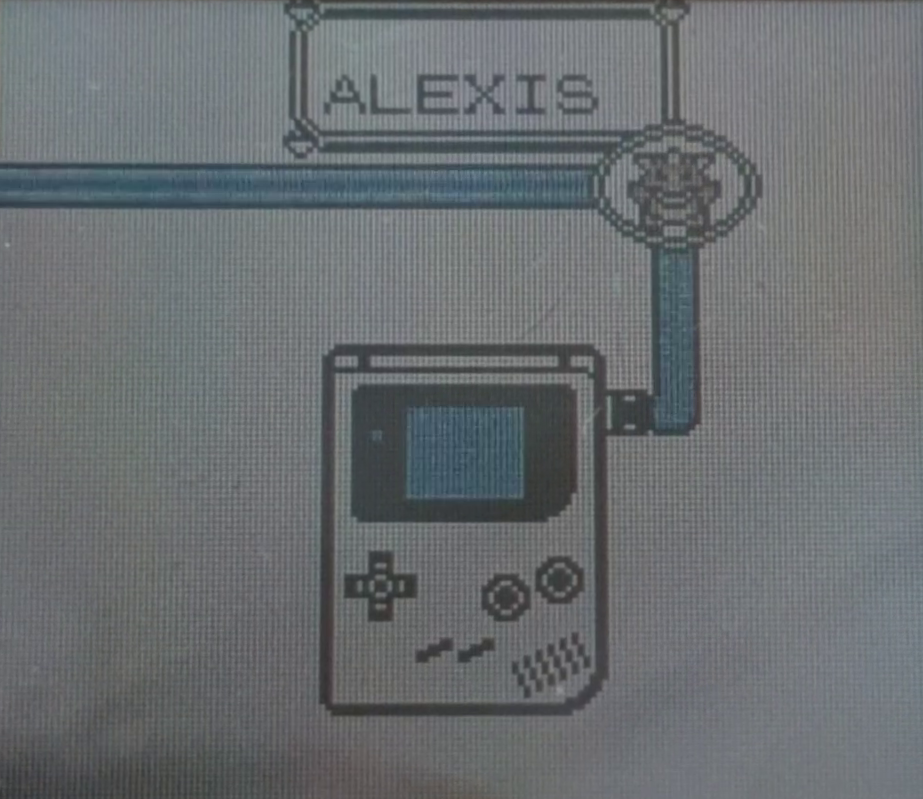
- Both players will see the trade animation, nothing is sent during that sequence (maybe because gameboys need some time to process the exchange).
- Evolutions are hardcoded, if a Kadabra, Machoke, Haunter or Graveler is traded both gameboys will independently start their evolve animation.
- I think developers decided this to avoid complicating the protocol.
- Just sending the player’s input (pressing ‘B’) to the other side won’t work:
- Players have a limited time to cancel evolutions, pressing ‘B’ at the last millisecond could cause the games to become out of sync.
- Nothing else has a limited time to send an input (not even in battles).
- A possible solution could be ‘pausing’ the evolution animation indefinitely and wait for the player’s ‘B’ input (if any).
- Anyway, this is why players can’t cancel cancel evolutions. Also probably the reason why everstones were introduced!
-
Once it ends, the master will repeatedly send 0x62 (14 times) followed by a stream of 0x00 (9 times), the slave returns this same sequence.
-
That exchange happens two times ((14) 0x62, (9) 0x00, (14) 0x62, (9) 0x00).
-
I haven’t tested what happens if unexpected sequences are sent (sorry!), so what i just described is only the normal exchange.
- After all this, players return to Seed Exchange. Players need to exchange their party data once more (because their party just changed!)
A COMPLETE Trade confirmation:
| #MSG | MASTER | SLAVE |
|---|---|---|
| X | 0x62 | 0x00 |
| X+1 | 0x62 | 0x62 |
| X+2 | 0x62 | 0x62 |
| X+3 | 0x62 | 0x62 |
| X+4 | 0x62 | 0x62 |
| X+5 | 0x62 | 0x62 |
| X+6 | 0x62 | 0x62 |
| X+7 | 0x62 | 0x62 |
| X+8 | 0x62 | 0x62 |
| X+9 | 0x62 | 0x62 |
| X+10 | 0x62 | 0x62 |
| X+11 | 0x62 | 0x62 |
| X+12 | 0x62 | 0x62 |
| X+13 | 0x62 | 0x62 |
| X+14 | 0x00 | 0x62 |
| X+15 | 0x00 | 0x00 |
| X+16 | 0x00 | 0x00 |
| X+17 | 0x00 | 0x00 |
| X+18 | 0x00 | 0x00 |
| X+19 | 0x00 | 0x00 |
| X+20 | 0x00 | 0x00 |
| X+21 | 0x00 | 0x00 |
| X+22 | 0x00 | 0x00 |
| X+23 | 0x62 | 0x00 |
| X+24 | 0x62 | 0x62 |
| X+25 | 0x62 | 0x62 |
| X+26 | 0x62 | 0x62 |
| X+27 | 0x62 | 0x62 |
| X+28 | 0x62 | 0x62 |
| X+29 | 0x62 | 0x62 |
| X+30 | 0x62 | 0x62 |
| X+31 | 0x62 | 0x62 |
| X+32 | 0x62 | 0x62 |
| X+33 | 0x62 | 0x62 |
| X+34 | 0x62 | 0x62 |
| X+35 | 0x62 | 0x62 |
| X+36 | 0x62 | 0x62 |
| X+37 | 0x00 | 0x62 |
| X+38 | 0x00 | 0x00 |
| X+39 | 0x00 | 0x00 |
| X+40 | 0x00 | 0x00 |
| X+41 | 0x00 | 0x00 |
| X+42 | 0x00 | 0x00 |
| X+43 | 0x00 | 0x00 |
| X+44 | 0x00 | 0x00 |
| X+45 | 0x00 | 0x00 |
| X+46 | SEED EXCHANGE PRAMBLE | 0x00 |
| X+47 | SEED EXCHANGE PRAMBLE | SEED EXCHANGE PRAMBLE |
Generation II
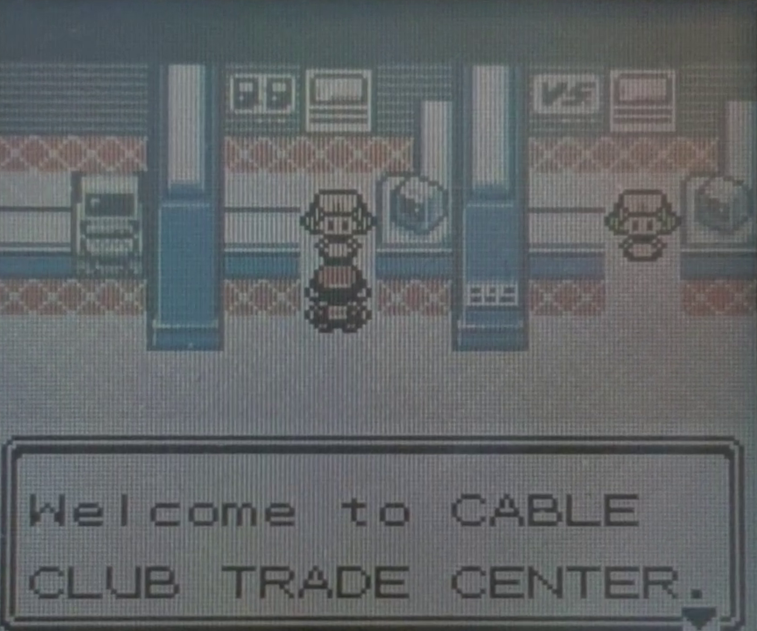
In Gen II there's one room for trading, and another one for battling, so both players need to talk to the same NPC
Handshake
Exactly the same as in Gen I: [Gen I] Handshake
Players Ready
-
Works like in Gen I ([Gen I] Players Ready) but with a different ready signal: It is 0x61 instead of 0x60.
-
This difference allows Gen II games to detect Gen I games at a very early stage (they’ll send 0x60). If that was the case Gen II games will abort the connection at the next stage, players will see the message: “You can’t link to the past here.”.
-
Gen I games will accept any ready message as long as its highest nibble is 6 (0x6X).
Room Selection
- Gen II games don’t have to select a room because players are required to head to different physical locations depending on whether they want to trade or to battle.
- HOWEVER, room selection is still part of the protocol, this time the games will handle this part automatically.
- Messages are almost the same as in Gen I: [Gen I] Room Selection):
- MENU MSG prefix stays the same, its first nibble has to be 0xD
- The following nibble is similar to Gen I with some differences:
- Now it doesn’t make sense to press A/B or to cancel the room selection (Room is already decided when talking to the corresponding NPC):
- 0xD1: Trade (In Gen I it was 0xD4).
- 0xD2: Battle (In Gen I it was 0xD5).
- 0xDY (Y being Anything else): Players will be disconnected (with a message that says the other player chose a different room).
- Now it doesn’t make sense to press A/B or to cancel the room selection (Room is already decided when talking to the corresponding NPC):
- When Gen II games detect that the other player is trying to connect from a Gen I game (see previous section), they’ll send 0xDE:
- By Gen I standards it means that both ‘A’ and ‘B’ are pressed and that cancel was being selected, it’s basically a double cancel.
- Games will disconnect after that.
Players Ready for Trade
- Serves the same purpose as in Gen I but messages are different:
- Master sends a stream of 0x75 (usually 14 times), followed by 0x00 (10 times). The same sequence is expected from the slave.
- Master then sends a stream of 0x76 (also 14 times) followed by 0x00. Slave has to mirror this as well.
- Slave can delay its response by some time (by sending anything else, usually 0x00), but now there is a timeout, several seconds for 0x75 and just a few seconds for 0x76.
- I haven’t tested if slaves also have a timeout while waiting for their master to transmit this sequence.
Full Example:
| #MSG | MASTER | SLAVE |
|---|---|---|
| X | 0x75 | 0x00 |
| X+1 | 0x75 | 0x75 |
| X+2 | 0x75 | 0x75 |
| X+3 | 0x75 | 0x75 |
| X+4 | 0x75 | 0x75 |
| X+5 | 0x75 | 0x75 |
| X+6 | 0x75 | 0x75 |
| X+7 | 0x75 | 0x75 |
| X+8 | 0x75 | 0x75 |
| X+9 | 0x75 | 0x75 |
| X+10 | 0x75 | 0x75 |
| X+11 | 0x75 | 0x75 |
| X+12 | 0x75 | 0x75 |
| X+13 | 0x75 | 0x75 |
| X+14 | 0x00 | 0x75 |
| X+15 | 0x00 | 0x00 |
| X+16 | 0x00 | 0x00 |
| X+17 | 0x00 | 0x00 |
| X+18 | 0x00 | 0x00 |
| X+19 | 0x00 | 0x00 |
| X+20 | 0x00 | 0x00 |
| X+21 | 0x00 | 0x00 |
| X+22 | 0x00 | 0x00 |
| X+23 | 0x00 | 0x00 |
| X+24 | 0x76 | 0x00 |
| X+25 | 0x76 | 0x76 |
| X+26 | 0x76 | 0x76 |
| X+27 | 0x76 | 0x76 |
| X+28 | 0x76 | 0x76 |
| X+29 | 0x76 | 0x76 |
| X+30 | 0x76 | 0x76 |
| X+31 | 0x76 | 0x76 |
| X+32 | 0x76 | 0x76 |
| X+33 | 0x76 | 0x76 |
| X+34 | 0x76 | 0x76 |
| X+35 | 0x76 | 0x76 |
| X+36 | 0x76 | 0x76 |
| X+37 | 0x76 | 0x76 |
| X+38 | 0x00 | 0x76 |
| X+39 | 0x00 | 0x00 |
| X+40 | 0x00 | 0x00 |
| X+41 | 0x00 | 0x00 |
| X+42 | 0x00 | 0x00 |
| X+43 | 0x00 | 0x00 |
| X+44 | 0x00 | 0x00 |
| X+45 | 0x00 | 0x00 |
| X+46 | 0x00 | 0x00 |
| X+47 | 0x00 | 0x00 |
| X+48 | 0x00 | 0x00 |
| X+49 | 0x00 | 0x00 |
| X+50 | SEED PREAMBLE | 0x00 |
| X+51 | SEED PREAMBLE | SEED PREAMBLE |
Seed Exchange
Exactly the same as in Gen I: [Gen I] Seed Exchange
Party Information Exchange
- It’s the same as in Gen I ([Gen I] Party Information Exchange) but with a bigger payload: It is now 441 bytes long (instead of 415 bytes in Gen I).
- Same restrictions apply (no 0xFE inside the payload or i’ll break things).
- As with Gen I, 0xFE is patched (See Patch Section).
Data Structure
-
This structure contains almost the same information as in Gen I, some fields were added, while others were moved to different offsets, a few useless fields were removed. I’ll describe everything below.
-
Strings: At least in english, the Gen II character encoding is compatible with Gen I, only glitched characters differ.
- As with Gen I, encodings are well documented here: Bulbapedia-> Character Encoding (Generation II).
Trainer Name
Same as in Gen I
Party Size
Same as in Gen I
Pokemon Id List (EGGS)!
- Same purpose as in Gen I.
- Pokemon ids are now their pokedex number (no more hidden ids!).
- Now it’s also used for eggs!:
- When a pokemon is still an egg its ID will be 0xFD here, this is a reserved pokemon id. This is the only difference between an egg and a normal pokemon.
- The type of pokemon that will hatch from this egg is specified in their Pokemon Structure.
- This is the only (valid) case where an ID in this list should not match the corresponding pokemon’s ID.
Trainer Id
- This field was added in Gen II
- Specifies the Trainer ID of the player that is currently trading (i don’t recall it being shown anywhere, so it may be useless).
- This is the first field that can be patched.
Pokemon Structure (x6)
- This structure is 48 bytes long (instead of 44 bytes in Gen I).
- The structure is somewhat documented here: Bulbapedia -> Pokemon Data Structure (Generation II)
- The fields for Type 1 and Type 2 were removed, they’re calculated based on the pokemon species (Gen I also did this so those fields were essentially useless).
-
Box level was also removed (it was also useless).
- Most of the remaining fields are the same as in Gen I, so i’ll just mention the differences:
- Id Number: It’s now the pokedex index of this pokemon (instead of a hidden ID).
- Hybrid pokemon cannot be traded (when this value differs from the one in the Pokemon Id List, then the pokemon is regarded as an unstable hybrid pokemon. Eggs are the exception (when the id in the list is 0xFD then this pokemon is an egg).
- Games have a specific check for these fields, if it fails then it informs that the pokemon is abnormal and can’t be traded.
- Held Item Id: The item which the current pokemon is holding, most of them can be found here: Bulbapedia -> List of items by index number.
- Some invalid items are converted into valid ones (hardcoded rules, most of those ids correspond to common catch rates in Gen I).
- More information can be found on The Cutting Room Floor -> Pokemon Gold & Silver -> Items and Glitch City -> Obtaining arbitrary items in G/S/C through Time Capsule
- This is the list of conversion rules:
Item Id Name Converted to 0x19 Teru-sama Leftovers 0x2d Teru-sama Bitter Berry 0x32 Teru-sama Gold Berry 0x5A Teru-sama Berry 0x64 Teru-sama Berry 0x78 Teru-sama Berry 0x7F Card Key Berry 0x87 Teru-sama Berry 0x8E Teru-sama Berry 0xC3 TM04 (Glitch) Berry 0xDC TM28 (Glitch) Berry 0xFA HM08 Berry 0xFF HM13 Berry
- Id Number: It’s now the pokedex index of this pokemon (instead of a hidden ID).
- Moving on:
- Indexes of moves 1 to 4: Same as Gen I, new moves were added in Gen II, so more move Ids are available.
- Original Trainer ID number: Same as in Gen I.
- Experience Points: Same as in Gen I.
- EV Data (HP, Attack, Defense, Speed, Special): Same as in Gen I. Special EV is shared between special Attack and special Defense.
- IV Data: Same as in Gen I.
- PP Values of moves 1 to 4: Same as in Gen I.
- Friendship / Remaining Egg Cycles (1 byte):
- If not an egg (Id in Pokemon Id List is NOT 0xFD) then the value will be interpreted as friendship, otherwise it’s the cycles remaining for the egg to hatch.
- A pokemon’s friendship value will reset to its base value when trading it, even if it’s traded back!. Base values can be found here: Bulbapedia -> List of Pokemon by Base Friendship
- Even if friendship resets when trading, it’s nice to actually be able to see this value!
- An egg cycle represents 256 steps, once the player walks that many steps the cycle count will decrease by 1, if it reaches 0 the egg will hatch.
- I haven’t tested if this value resets as well.
- Pokerus (1 byte): Highest nibble is the strain of the virus, lowest nibble stores the remaining days for the pokemon to become cured. If a pokemon has or had pokerus, then it’ll earn double EVs after battles.
- If strain and remaining days are not zero, then the pokemon is currently infected.
- If strain is not zero but remaining days is zero then the pokemon is cured, it can’t be infected again.
- Remaining days decrease by one after midnight.
- Trading a pokemon to Gen I and back will erase this information, curing it or allowing it to get infected once more.
- More information: Bulbapedia -> Pokerus -> Technical Information.
- Caught Data (2 bytes):
- Pokemon caught in Gen I or in Gold/Silver will have 0x00 in this field.
- In Pokemon Crystal it stores information about their capture:
- The first 2 bits record the time of day (1: Morning, 2: Day, 3: Night)
- The 6 following bits record their level (up to 63).
- The first bit of the second bite stores the Original Trainer’s gender (0: Male, 1: Female)
- The last 7 bits stores where it was captured. A list of locations can be found here: Bulbapedia -> List of Locations by Index Number
- Trading a pokemon to Gen I and back will erase this information.
- Level: Same as in Gen I. Pokemon with a level higher than 100 will be considered abnormal and cannot be traded.
- Status Condition: Same as in Gen I.
- Unused Byte: Always 0x00.
- Current HP: Same as in Gen I.
- Stats (HP, Attack, Defense, Speed, Special Attack, Special Defense): Special stat was split into Special Attack and Special Defense, they share the same EV and IV. Base values may differ and depend on each species.
Original Owner Name (x6)
Similar to Gen I, but names end with an extra terminator (0x50) instead of one. Nothing happens if a name has only a single terminator.
Pokemon Nickname (x6)
Same as in Gen I, Egg names are always “EGG” followed by a single string terminator (0x50) and then zeros (instead of only string terminators as with other pokemon names). Nothing happens if the egg’s name is not EGG.
Zeros (x3)
- In Gen I these 3 bytes were the first bytes of the player’s pokedex data (which were a bit field of owned pokemon). They were probably being transmitted by mistake.
- It seems that Gen II fixed this issue and now will only send 3 0x00 no matter what happens in the player’s pokedex. I’m not sure why they weren’t removed entirely.
Patch Section
- Same principle as in Gen I: [Gen I] Patch Section
- Stage 2 is a little longer (because the total payload is 26 bytes longer (441 instead of 415).
- The patch limit stays at 190 (buffer is still 200):
- The source code for Gen II games made me realize that those first 10 bytes were probably reserved for patching seeds but this was later discarded: Pokegold -> Link.asm#L590
- The buffer overflow was fixed: Pokegold -> Link.asm#L593-597
- The other game can still send offsets beyond the patch area forcing it to write 0xFE at those offsets: Pokegold -> Link.asm#L297-318
Here's the updated list of offsets for Gen II:
0xXX, 0xXX, 0xXX, 0xXX, 0xXX, 0xXX, 0xXX, 0xXX, 0xXX, 0xXX, 0xXX,   # Trainer Name
0xXX,                                                               # Party Size
0xXX, 0xXX, 0xXX, 0xXX, 0xXX, 0xXX,                                 # Party Species list
0xXX,                                                               # List Terminator

0x01, 0x02,                                                         # Trainer ID

# ----------------- POKEMON 1 -----------------
0x03,               # Species
0x04,               # Held Item

0x05,               # Move 1
0x06,               # Move 2
0x07,               # Move 3
0x08,               # Move 4

0x09, 0x0A,         # Original Trainer ID
0x0B, 0x0C, 0x0D,   # Experience Points

0x0E, 0x0F,         # Health EV
0x10, 0x11,         # Attack EV
0x12, 0x13,         # Defense EV
0x14, 0x15,         # Speed EV
0x16, 0x17,         # Special (ATK + DEF) EV

0x18, 0x19,         # IV Data

0x1A,               # Move 1 PP
0x1B,               # Move 2 PP
0x1C,               # Move 3 PP
0x1D,               # Move 3 PP

0x1E,               # Friendship
0x1F,               # Pokerus bits
0x20, 0x21,         # Caught data (Crystal only)

0x22,               # Level
0x23,               # Status bits
0x24,               # Unused

0x25, 0x26,         # Current HP
0x27, 0x28,         # Max HP
0x29, 0x2A,         # Attack
0x2B, 0x2C,         # Defense
0x2D, 0x2E,         # Speed
0x2F, 0x30,         # Special Attack
0x31, 0x32,         # Special Defense

# ----------------- POKEMON 2 -----------------
0x33,               # Species
0x34,               # Held Item

0x35,               # Move 1
0x36,               # Move 2
0x37,               # Move 3
0x38,               # Move 4

0x39, 0x3A,         # Original Trainer ID
0x3B, 0x3C, 0x3D,   # Experience Points

0x3E, 0x3F,         # Health EV
0x40, 0x41,         # Attack EV
0x42, 0x43,         # Defense EV
0x44, 0x45,         # Speed EV
0x46, 0x47,         # Special (ATK + DEF) EV

0x48, 0x49,         # IV Data

0x4A,               # Move 1 PP
0x4B,               # Move 2 PP
0x4C,               # Move 3 PP
0x4D,               # Move 3 PP

0x4E,               # Friendship
0x4F,               # Pokerus bits
0x50, 0x51,         # Caught data (Crystal only)

0x52,               # Level
0x53,               # Status bits
0x54,               # Unused

0x55, 0x56,         # Current HP
0x57, 0x58,         # Max HP
0x59, 0x5A,         # Attack
0x5B, 0x5C,         # Defense
0x5D, 0x5E,         # Speed
0x5F, 0x60,         # Special Attack
0x61, 0x62,         # Special Defense

# ----------------- POKEMON 3 -----------------
0x63,               # Species
0x64,               # Held Item

0x65,               # Move 1
0x66,               # Move 2
0x67,               # Move 3
0x68,               # Move 4

0x69, 0x6A,         # Original Trainer ID
0x6B, 0x6C, 0x6D,   # Experience Points

0x6E, 0x6F,         # Health EV
0x70, 0x71,         # Attack EV
0x72, 0x73,         # Defense EV
0x74, 0x75,         # Speed EV
0x76, 0x77,         # Special (ATK + DEF) EV

0x78, 0x79,         # IV Data

0x7A,               # Move 1 PP
0x7B,               # Move 2 PP
0x7C,               # Move 3 PP
0x7D,               # Move 4 PP

0x7E,               # Friendship
0x7F,               # Pokerus bits
0x80, 0x81,         # Caught data (Crystal only)

0x82,               # Level
0x83,               # Status bits
0x84,               # Unused

0x85, 0x86,         # Current HP
0x87, 0x88,         # Max HP
0x89, 0x8A,         # Attack
0x8B, 0x8C,         # Defense
0x8D, 0x8E,         # Speed
0x8F, 0x90,         # Special Attack
0x91, 0x92,         # Special Defense

# ----------------- POKEMON 4 -----------------
0x93,               # Species
0x94,               # Held Item

0x95,               # Move 1
0x96,               # Move 2
0x97,               # Move 3
0x98,               # Move 4

0x99, 0x9A,         # Original Trainer ID
0x9B, 0x9C, 0x9D,   # Experience Points

0x9E, 0x9F,         # Health EV
0xA0, 0xA1,         # Attack EV
0xA2, 0xA3,         # Defense EV
0xA4, 0xA5,         # Speed EV
0xA6, 0xA7,         # Special (ATK + DEF) EV

0xA8, 0xA9,         # IV Data

0xAA,               # Move 1 PP
0xAB,               # Move 2 PP
0xAC,               # Move 3 PP
0xAD,               # Move 4 PP

0xAE,               # Friendship
0xAF,               # Pokerus bits
0xB0, 0xB1,         # Caught data (Crystal only)

0xB2,               # Level
0xB3,               # Status bits
0xB4,               # Unused

0xB5, 0xB6,         # Current HP
0xB7, 0xB8,         # Max HP
0xB9, 0xBA,         # Attack
0xBB, 0xBC,         # Defense
0xBD, 0xBE,         # Speed
0xBF, 0xC0,         # Special Attack
0xC1, 0xC2,         # Special Defense

# ----------------- POKEMON 5 -----------------
0xC3,               # Species
0xC4,               # Held Item

0xC5,               # Move 1
0xC6,               # Move 2
0xC7,               # Move 3
0xC8,               # Move 4

0xC9, 0xCA,         # Original Trainer ID
0xCB, 0xCC, 0xCD,   # Experience Points

0xCE, 0xCF,         # Health EV
0xD0, 0xD1,         # Attack EV
0xD2, 0xD3,         # Defense EV
0xD4, 0xD5,         # Speed EV
0xD6, 0xD7,         # Special (ATK + DEF) EV

0xD8, 0xD9,         # IV Data

0xDA,               # Move 1 PP
0xDB,               # Move 2 PP
0xDC,               # Move 3 PP
0xDD,               # Move 3 PP

0xDE,               # Friendship
0xDF,               # Pokerus bits
0xE0, 0xE1,         # Caught data (Crystal only)

0xE2,               # Level
0xE3,               # Status bits
0xE4,               # Unused

0xE5, 0xE6,         # Current HP
0xE7, 0xE8,         # Max HP
0xE9, 0xEA,         # Attack
0xEB, 0xEC,         # Defense
0xED, 0xEE,         # Speed
0xEF, 0xF0,         # Special Attack
0xF1, 0xF2,         # Special Defense


# ----------------- POKEMON 6 -----------------
0xF3,               # Species
0xF4,               # Held Item

0xF5,               # Move 1
0xF6,               # Move 2
0xF7,               # Move 3
0xF8,               # Move 4

0xF9, 0xFA,         # Original Trainer ID
0xFB, 0xFC, |||||||||||||||||||||||||||||||||||||||||||| STAGE 2 |||||||||||||| 0x01 # Experience Points

0x02, 0x03,         # Health EV
0x04, 0x05,         # Attack EV
0x06, 0x07,         # Defense EV
0x08, 0x09,         # Speed EV
0x0A, 0x0B,         # Special (ATK + DEF) EV

0x0C, 0x0D,         # IV Data

0x0E,               # Move 1 PP
0x0F,               # Move 2 PP
0x10,               # Move 3 PP
0x11,               # Move 4 PP

0x12,               # Friendship
0x13,               # Pokerus bits
0x14, 0x15,         # Caught data (Crystal only)

0x16,               # Level
0x17,               # Status bits
0x18,               # Unused

0x19, 0x1A,         # Current HP
0x1B, 0x1C,         # Max HP
0x1D, 0x1E,         # Attack
0x1F, 0x20,         # Defense
0x21, 0x22,         # Speed
0x23, 0x24,         # Special Attack
0x25, 0x26,         # Special Defense

0x27, 0x28, 0x29, 0x2A, 0x2B, 0x2C, 0x2D, 0x2E, 0x2F, 0x30, 0x31,   # Pokemon 1 Original Trainer Name
0x32, 0x33, 0x34, 0x35, 0x36, 0x37, 0x38, 0x39, 0x3A, 0x3B, 0x3C,   # Pokemon 2 Original Trainer Name
0x3D, 0x3E, 0x3F, 0x40, 0x41, 0x42, 0x43, 0x44, 0x45, 0x46, 0x47,   # Pokemon 3 Original Trainer Name
0x48, 0x49, 0x4A, 0x4B, 0x4C, 0x4D, 0x4E, 0x4F, 0x50, 0x51, 0x52,   # Pokemon 4 Original Trainer Name
0x53, 0x54, 0x55, 0x56, 0x57, 0x58, 0x59, 0x5A, 0x5B, 0x5C, 0x5D,   # Pokemon 5 Original Trainer Name
0x5E, 0x5F, 0x60, 0x61, 0x62, 0x63, 0x64, 0x65, 0x66, 0x67, 0x68,   # Pokemon 6 Original Trainer Name

0x69, 0x6A, 0x6B, 0x6C, 0x6D, 0x6E, 0x6F, 0x70, 0x71, 0x72, 0x73,   # Pokemon 1 Nickname
0x74, 0x75, 0x76, 0x77, 0x78, 0x79, 0x7A, 0x7B, 0x7C, 0x7D, 0x7E,   # Pokemon 2 Nickname
0x7F, 0x80, 0x81, 0x82, 0x83, 0x84, 0x85, 0x86, 0x87, 0x88, 0x89,   # Pokemon 3 Nickname
0x8A, 0x8B, 0x8C, 0x8D, 0x8E, 0x8F, 0x90, 0x91, 0x92, 0x93, 0x94,   # Pokemon 4 Nickname
0x95, 0x96, 0x97, 0x98, 0x99, 0x9A, 0x9B, 0x9C, 0x9D, 0x9E, 0x9F,   # Pokemon 5 Nickname
0xA0, 0xA1, 0xA2, 0xA3, 0xA4, 0xA5, 0xA6, 0xA7, 0xA8, 0xA9, 0xAA,   # Pokemon 6 Nickname

0xAB, 0xAC, 0xAD,    # Zeros (Patchable?)
Mail Information Exchange
- Gen II games introduced Mails, which are special held items. Players can write text messages into mails (before attaching them to a pokemon). Once attached they can’t be modified any further.
- Pokemon holding mails can be traded, so those messages need to be exchanged!
-
Each mail is stored in 47 bytes. So a player with a full party of 6 pokemon, each holding a mail will need to send an additional 282 bytes.
- Even if no pokemon has attached mails, those 282 bytes will still be exchanged!:
- [Information Disclosure] Games don’t ever erase memory addresses that store mail information (of mails attached to pokemon in the player’s party).
- This means that if a mail is attached to a pokemon and then removed, the information is still there (and is sent to the other player). It’ll only change when another mail is attached.
- Games didn’t really care about this because even if this information was sent, the other player wouldn’t be able to read it (the only legal way to access it is by receiving a pokemon with a held mail).
- So, yes, we can read the contents of every attached mail even before receiving the pokemon that holds it, and we can even read contents of deleted/removed mails.
- First things first, there’s a preamble before exchanging the payload, this time it is a stream of six 0x20:
Mail Preamble
| #MSG | MASTER | SLAVE |
|---|---|---|
| X | 0x20 | 0x00 |
| X+1 | 0x20 | 0x20 |
| X+2 | 0x20 | 0x20 |
| X+3 | 0x20 | 0x20 |
| X+4 | 0x20 | 0x20 |
| X+5 | 0x20 | 0x20 |
| X+6 | MAIL DATA | 0x20 |
| X+7 | MAIL DATA | MAIL DATA |
- Why 0x20 instead of 0xFD? My guess is that those 6 bytes were intended to represent the length of each mail, but that idea was later discarded to simplify the protocol and now every mail has a fixed text length of 32 (0x20) bytes.
Mail Data Structure
- Mails are divided into 2 sections:
- Mail contents (33 bytes): This is the message of the mail, one byte is reserved for a mandatory line break, the content itself has a maximum length of 32.
- Mail Metadata (14 Bytes): Extra information about the mail.
- If 0xFE (character ‘8’) is contained within a mail’s message then it’ll be replaced with 0x21 (which is not a valid character):
- The other end will revert any 0x21 back to 0xFE. This is much simpler than a patch section.
- If a mail metadata contains 0xFE then it’ll also be patched with 0x21 but this part cannot be unpatched so easily:
- Mail metadata can normally contain any value (including 0x21), so the other end cannot distinguish between an authentic 0x21 and a patched 0x21. A mail patch section is needed:
The payload itself is composed of:
Contents (x6)
- These are the mail contents of each pokemon in the player’s party:
- The contents can be up to 33 bytes of length but one byte is reserved for a line break (resulting in 2 lines of 16 characters each).
- We can create a mail without line breaks, it won’t be displayed correctly but nothing else breaks (pun intended).
- If the content is less than 32 bytes, the message ends with a string terminator (0x50), any extra bytes are just 0x00.
- Any 0xFE will be ignored (which shouldn’t be there to begin with!).
- Sending 0x21 will make the other end to interpret it as ‘8’.
Metadata (x6)
- Mail metadata consists of:
- Author’s name (displayed at the bottom of the message, 10 bytes). It is 1 byte shorter than the other strings, but the eleventh byte was reserved for the string terminator, so there isn’t a problem here.
- Author’s trainer ID (not shown, 2 bytes).
- The species (pokedex number) of the pokemon that first held this mail (1 byte).
- The type of mail (item ID, 1 byte), there’re many types of mails, each one has a different background image. It is not used (the games use the held item ID field in the pokemon data structure).
- Any of those fields could potentially have 0xFE in them (Although only the Trainer ID field can contain 0xFE without any glitches). It’ll be replaced with 0x21 and its offset will be sent later (in the mail patch section).
Mail Patch Section
- Similar to the Patch Section, players exchange a list of offsets which point to parts of the (already exchanged) mail information payload, specifically at bytes in the metadata section.
- Mail contents didn’t need a patch section (0xFE was replaced with 0x21 (a value that never appears in mail contents) and then every 0x21 was changed back to 0xFE).
-
Metadata can contain any value (from 0x00 to 0xFF), so the approach used for mail contents couldn’t be used here.
- Only one list needs to be exchanged because the 6 metadata structures combined are just 84 bytes long. The Patch Section needed 2 lists because the patchable size was over 255 bytes.
- This list also ends with 0xFF.
- There’s no preamble, so the list starts immediately after the last byte of the mails payload.
- Offset values range from 0x01 to [NOT CONFIRMED] 0xFC.
- Any 0XFE will be ignored, as if nothing was sent.
- 102 bytes are always exchanged. This ensures that even in the worst case players can patch all the bytes in the metadata section.
- After players finish sending their lists they will repeatedly send 0x00 until 102 bytes are exchanged.
In this example, the Trainer ID of player 1 is 43518 (0xA9FE), this means that every mail attached by this player will have at least one byte to be patched (which corresponds to that ID). Player 1 has 6 pokemon, only the first and the last one have attached mails. Player 2 doesn’t have any pokemon holding a mail.
| #MSG | MASTER | SLAVE |
|---|---|---|
| X | 0x0C | MAIL DATA |
| X+1 | 0x52 | 0xFF |
| X+2 | 0xFF | 0x00 |
| X+3 | 0x00 | 0x00 |
| X+4 | 0x00 | 0x00 |
| X+102 | 0x00 | 0x00 |
Here's the offset of every byte in the metadata section:
# -------- Metadata 1 --------
0x01, 0x02, 0x03, 0x04, 0x05, 0x06, 0x07, 0x08, 0x09, 0x0A,  # Author's Name
0x0B, 0x0C,                                                  # Author's Trainer Id
0x0D,                                                        # Pokedex number of the pokemon which first held this mail
0x0E,                                                        # Item Id of this mail

# -------- Metadata 2 --------
0x0F, 0x10, 0x11, 0x12, 0x13, 0x14, 0x15, 0x16, 0x17, 0x18,  # Author's Name
0x19, 0x1A,                                                  # Author's Trainer Id
0x1B,                                                        # Pokedex number of the pokemon which first held this mail
0x1C,                                                        # Item Id of this mail

# -------- Metadata 3 --------
0x1D, 0x1E, 0x1F, 0x20, 0x21, 0x22, 0x23, 0x24, 0x25, 0x26,  # Author's Name
0x27, 0x28,                                                  # Author's Trainer Id
0x29,                                                        # Pokedex number of the pokemon which first held this mail
0x2A,                                                        # Item Id of this mail

# -------- Metadata 4 --------
0x2B, 0x2C, 0x2D, 0x2E, 0x2F, 0x30, 0x31, 0x32, 0x33, 0x34,  # Author's Name
0x35, 0x36,                                                  # Author's Trainer Id
0x37,                                                        # Pokedex number of the pokemon which first held this mail
0x38,                                                        # Item Id of this mail

# -------- Metadata 5 --------
0x39, 0x3A, 0x3B, 0x3C, 0x3D, 0x3E, 0x3F, 0x40, 0x41, 0x42,  # Author's Name
0x43, 0x44,                                                  # Author's Trainer Id
0x45,                                                        # Pokedex number of the pokemon which first held this mail
0x46,                                                        # Item Id of this mail

# -------- Metadata 6 --------
0x47, 0x48, 0x49, 0x4A, 0x4B, 0x4C, 0x4D, 0x4E, 0x4F, 0x50,  # Author's Name
0x51, 0x52,                                                  # Author's Trainer Id
0x53,                                                        # Pokedex number of the pokemon which first held this mail
0x54,                                                        # Item Id of this mail
Trade Request
Same as in Gen I except that the choice prefix is 0x7X instead of 0x6X, (0x70 to 0x75 to choose a pokemon, 0x7F to exit the menu).
Trade Confirmation
Same as in Gen I except that the choice prefix is 0x7X instead of 0x6X (0x71 to cancel and 0x72 to accept).
Trade Sequence
- Similar to Gen I, nothing is sent while the trade animation is playing. Everstones prevent Kadabra, Graveler, Haunter, and Machoke from evolving.
- After the trade is complete there’s also a confirmation sequence, which consists in 0x7X (usually 14 times) followed by 0x00 (10 times):
- For most traded pokemon this byte will be 0x70.
- If the player sent a Mew the value will be 0x71.
- If the player sent a Celebi the value will be 0x72.
- I’m not sure why this value changes with Mew and Celebi, the games don’t seem to care about it. The assembly code can be found here: Pokegold -> Link.asm#L1827-1852.
- After that sequence both games return to Players Ready for Trade.
Example: Master sent a normal pokemon, slave sent a Celebi:
| #MSG | MASTER | SLAVE |
|---|---|---|
| X | 0x70 | 0x00 |
| X+1 | 0x70 | 0x72 |
| X+2 | 0x70 | 0x72 |
| X+3 | 0x70 | 0x72 |
| X+4 | 0x70 | 0x72 |
| X+5 | 0x70 | 0x72 |
| X+6 | 0x70 | 0x72 |
| X+7 | 0x70 | 0x72 |
| X+8 | 0x70 | 0x72 |
| X+9 | 0x70 | 0x72 |
| X+10 | 0x70 | 0x72 |
| X+11 | 0x70 | 0x72 |
| X+12 | 0x70 | 0x72 |
| X+13 | 0x70 | 0x72 |
| X+14 | 0x00 | 0x72 |
| X+15 | 0x00 | 0x00 |
| X+16 | 0x00 | 0x00 |
| X+17 | 0x00 | 0x00 |
| X+18 | 0x00 | 0x00 |
| X+19 | 0x00 | 0x00 |
| X+20 | 0x00 | 0x00 |
| X+21 | 0x00 | 0x00 |
| X+22 | 0x00 | 0x00 |
| X+23 | 0x00 | 0x00 |
| x+24 | READY FOR TRADE | 0x00 |
| x+25 | READY FOR TRADE | READY FOR TRADE |
Time Capsule
Gen II games can use the time capsule to trade with Gen I games, they’ll act almost exactly as a Gen I game except for a few things:
- At the Players Ready stage they’ll send 0x61 instead of 0x60:
- Gen I games will accept any message that starts with 0x6X.
- Gen II games can detect whether or not the other player is in fact a Gen I game or a Gen II game which is also using the time capsule, if that’s the case it’ll disconnect. Trading between 2 Gen II games through the time capsule isn’t allowed.
- Gen II games don’t send the single 0xFE before signaling that they’re ready, see Players Ready for trade.
- If its party is less than 6, then it’ll fill the remaining bytes of the Pokemon Id List with 0x00 instead of 0xFF (it still sends a single 0xFF to terminate the list).
- It won’t trade any pokemon above level 100, considering it abnormal.
- Gen II games won’t accept pokemon whose typing fields don’t match the types of that pokemon species. (E.g a grass type Mewtwo).
- Magnemite and Magneton are the exception. their types changed between Gen I (electric/electric) and Gen II (electric/steel). It’ll accept a magnemite/magneton of ANY type (e.g Psychic Fire). Although those values will be discarded as Gen II games don’t store types per pokemon, they’ll just look at the types of the species instead.
- Most glitch pokemon in Gen I don’t have the same types as their corresponding Gen II pokemon, that’s why they can’t be traded. Modifying their type values will make Gen II games accept them.
- Gen II games can see and accept Gen II only pokemon coming from a Gen I game. (For example the glitch Gen I pokemon ‘M ‘N g is seen as a Celebi by Gen II games, if the Gen I player manages to modify its type from Rock/Ground to Psychic/Grass then Gen II games will accept it (and receive a Celebi)!
- Gen II games will recalculate the Special Attack / Special Defense stats of the received pokemon (The “Special” stat that Gen I games send is discarded). Other stats are unaffected.
- Friendship/Pokerus/Caught Data information will be permanently erased.
- Shininess/gender information is preserved between trades (it’s stored in the pokemon’s IV data).
- Shiny Pokemon can be obtained in Gen I games, but only Gen II games can see it.
- Everstones won’t work (We’re in a simulated Gen I environment).